

Got a tip for us?
Let us know
Become a MacRumors Supporter for $50/year with no ads, ability to filter front page stories, and private forums.
Compressing PDFs
- Thread starter Dark Lain
- Start date
- Sort by reaction score
You are using an out of date browser. It may not display this or other websites correctly.
You should upgrade or use an alternative browser.
You should upgrade or use an alternative browser.


PDF files are pure ASCII text. Lossy compression is not possible.Dark Lain said:Is there a freeware program for compressing pdf files with LZW compression? Even a comand line solution would be ok.
I prefer LZW due to the fact that it is losses.
If not what shareware utilities would you recomend that can do this.

Well I know that you can use Automator to compress the images in a PDF only. That might be worth a shot. If you are not familiar with Automator I could probably drum up a pretty quick workflow for you.
Actually I figured it out very fast:
Finder: Get Selected Item
PDF: Compress PDF Images
Finder: Open File in Default Application
Once the file opens you'll need to save a copy.
Actually I figured it out very fast:
Finder: Get Selected Item
PDF: Compress PDF Images
Finder: Open File in Default Application
Once the file opens you'll need to save a copy.
The type of tools that give you that kind of control are PDF distillation apps. The two that I use are Adobe Acrobat Distiller (part of Acrobat) and Stone Design PStill ($69).Dark Lain said:I prefer LZW due to the fact that it is losses.
If not what shareware utilities would you recomend that can do this.
In both cases you are limited to either JPEG or ZIP compression of color images (and CCITT Group 3 and Group 4 for monochrome images).
The place where you would find LZW mainly used would be in multipage TIFF documents, which have been used for similar purposes as PDFs in the past.

It's a little-known trick, but you can compress PDFs in OSX without using a third-party tool, or Automator. In the print dialog box, choose ColorSync from the Copies & Pages drop down menu and select Reduce File Size from the Quartz menu. This standard Quartz filter doesn't do much to reduce file size in my experience, but additional filters can be made using the ColorSync utility, which can be accessed directly by selecting Add Filters... from the Quartz dialog box. Making the filter do what you want is a trial and error process, but it can be done. And once it's done, the filter is accessible right in the Print dialog box.
... but only in 10.3 and later.IJ Reilly said:It's a little-known trick, but you can compress PDFs in OSX without using a third-party tool, or Automator...

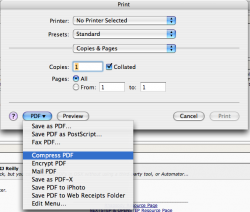
kingjr3 said:I wonder what this option does?
Not much, in my experience. I've had much better results working with the ColorSync filters.

Hmm...I turned a 504 kb into a 144 kb one.IJ Reilly said:Not much, in my experience. I've had much better results working with the ColorSync filters.
Register on MacRumors! This sidebar will go away, and you'll see fewer ads.