Become a MacRumors Supporter for $50/year with no ads, ability to filter front page stories, and private forums.

corywoolf

macrumors 65816
Original poster
Jun 28, 2004
1,352
4
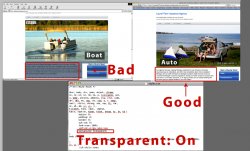
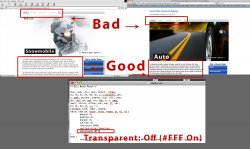
I am having trouble getting rid of this strange blue background that only loads in IE 6-8. I figured out that if I turn transparency off for the background it solves that problem, but then makes the topical navigation buttons load incorrectly. I have outlined the important areas in my screenshots and have also attached a compressed folder containing the index page and CSS style sheet (in rw_common folder). The CSS style sheet is the focus of this problem. Any help would be greatly appreciated. I am also getting a pop up in IE that says part of the page is secure and part is not. I think all my images on the index page are coming from the SSL side of my site, if you catch why IE is doing this, that would also be excellent. Hopefully it's a simple fix. :rolleyes:

https://www.allstatemichiganquote.com

Thanks in advance,

- Cory
 

Attachments

  • transparentoff.jpg
    transparentoff.jpg
    379.6 KB · Views: 126
  • transparenton.jpg
    transparenton.jpg
    251.8 KB · Views: 88
  • popup.jpg
    popup.jpg
    138.8 KB · Views: 89
  • allstatemichiganquote.com.zip
    137.2 KB · Views: 78
Two issues:

First, the CSS background property "transparent" is not supported cross-browser - those you can use are listed here. In CSS, right now, you can adjust opacity across ALL modern browsers with something like this (example, 50% transparency of selected content):

Code:
selector {
	filter: alpha(opacity=50); /* internet explorer */
	-khtml-opacity: 0.5;      /* khtml, old safari */
	-moz-opacity: 0.5;       /* mozilla, netscape */
	opacity: 0.5;           /* fx, safari, opera */
	}

Obviously adjust the 50% to whatever you want, for each and use your own selector of course to target only what needs to be transparent.

Which brings me to issue #2

CSS cacades! You applied the background transparency to tons of tags in your initial top level selector, simply remove it from and create a new selector further down in your style sheet (i.e. using the customized CSS shown above). You have tons of style sheets and you know your code better than I do, so up to you to adjust accordingly. This advice should help you do that.

-jim

ps: For image transparency, remember MSIE 6 has alpha transparency issues with PNG files so if you opt not to use CSS and use your image editor to create the transparency instead, the hack to fix the MSIE 6/PNG issue is documented here.
 
Two issues:

First, the CSS background property "transparent" is not supported cross-browser - those you can use are listed here. In CSS, right now, you can adjust opacity across ALL modern browsers with something like this (example, 50% transparency of selected content):

Code:
selector {
	filter: alpha(opacity=50); /* internet explorer */
	-khtml-opacity: 0.5;      /* khtml, old safari */
	-moz-opacity: 0.5;       /* mozilla, netscape */
	opacity: 0.5;           /* fx, safari, opera */
	}

Obviously adjust the 50% to whatever you want, for each and use your own selector of course to target only what needs to be transparent.

Which brings me to issue #2

CSS cacades! You applied the background transparency to tons of tags in your initial top level selector, simply remove it from and create a new selector further down in your style sheet (i.e. using the customized CSS shown above). You have tons of style sheets and you know your code better than I do, so up to you to adjust accordingly. This advice should help you do that.

-jim

ps: For image transparency, remember MSIE 6 has alpha transparency issues with PNG files so if you opt not to use CSS and use your image editor to create the transparency instead, the hack to fix the MSIE 6/PNG issue is documented here.

Thanks a bunch for your reply, it ended up being a problem in the HTML that I had missed when looking through several times. There was a hard to find span that was causing the blue background in IE only.
 
Register on MacRumors! This sidebar will go away, and you'll see fewer ads.