Become a MacRumors Supporter for $50/year with no ads, ability to filter front page stories, and private forums.

googlydoo

macrumors newbie
Original poster
Jun 3, 2005
11
0
Hey, can anyone tell me why my Garageband doesn't show an option for "Line-in audio," like it should for a Powerbook. I have a 1.33ghz 12". I would like to plug in my guitar and use the built-in amp (even though I heard it wasn't so good). Any suggestions? Thanks!

 
Try going to system preferences and selecting your line in there. It should then show up in Garageband. BTW -IMHO the guitar amp simulation in GB is actually pretty servicable with a little tweaking. Good luck.
 
RE:

I don't know, the Line-in is in System Preferences just fine, but no matter what I do in there, select or not, it still doesn't show up in GarageBand. Maybe an upgrade would fix this?
 
in your utilities folder, there should be a "midi setup assistant" or similar, you must change a one of the settings from internal mic to audio - in. It's pretty intuitive once you get the program open and putz for a min. or two.

Sorry I can't really clarify now (I'm at work on a frigging PC POS). I'll post pics this evening when I get home if you still haven't figured it out.

The built in amps in GB aren't that bad, as far a tone is concerned. You'll need to run your guitar through a preamp first to get good quality sound however. The signal your PB will receive will be pretty crappy without some type of amplification. I think a lot of people neglect this, and then say the GB amp sims are bad (IMHO).

Guitar->preamp->PB
or
Guitar->guitar amp->PB

hope that helps
 
Thanks guys, this is really helpful. I went into the Audio MIDI Setup, but unfortunately the there is nothing but the "Built-in Audio" option under Default Input. It's strange. . .
 
when I first got my PB back in Feb, i was also frustrated with your predicament.

let me get back to you when I get home tonight.

I'll post some pics and a mini-tutorial of what I did . . .

hopefully, you'll be able to get the audio in to work then
 
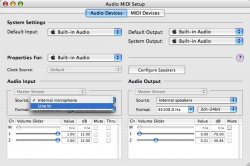
open Audio Midi Setup

Under the "Audio Devices" tab, select LINE-IN for the Audio Input (see attached pic to see what it looks like for me)

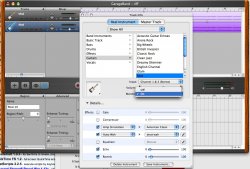
In GB, create a new track (or open existing). Open up the track info, and "turn" the monitor on by selecting it from a pull down menu (see other pic to look at what I am looking at)

Hope this helps, this is what I have done to record in GB.
 

Attachments

  • audio_midi_setup.jpg
    audio_midi_setup.jpg
    111.2 KB · Views: 197
  • garage_band.jpg
    garage_band.jpg
    205.2 KB · Views: 212
Yup... good advice, you need to select the appropriate input in both the audio / midi setup, and in GB. Then, you need to turn on monitoring in GB.

If you can't hear it, in the dialog box where you turn on the monitoring, set the input to channel two (mono).

A couple of other words of advice:

1) The built in audio input on Macs is unpowered, so unless your guitar has active electronics you will need to preamp the signal...unless you are happy with mediocre tone. Apple is a bit misleading when they say guitar straight into the Mac. You can do it, but the tone bites.

2) If you are buying a preamp device such as a pod, or a M-Audio Fast Track, all is good. If you are taking a line out from your amp, however, make sure it is from the line out port of your preamp. Do NOT take a speaker out signal and plug it into your powerbook.... you will fry things!

Cheers!
 
works!

Hey, thanks for all the great advice. I am humbled by your wisdom.

I actually have a nice amp but I don't know if it will be able to send a line-out (although it does have an Effects Signal Out). I really just want to try this out for the free effects, and if it's an okay tone to play around in Guitar-Rig, it might be a good purchase just for fun.

Although, a Pre-amp would generally be a nice purchase for an assortment of things.

Thanks again guys!
 
Register on MacRumors! This sidebar will go away, and you'll see fewer ads.