Become a MacRumors Supporter for $50/year with no ads, ability to filter front page stories, and private forums.

ahostmadsen

macrumors 65816
Original poster
Dec 28, 2009
1,135
884
I would have thought that when I tell the phone that I do not want to be disturbed, that would obviously also means I don’t want to receive phone calls, but not to Apple it seems.

The settings in focus mode are confusing. I don’t see anything directly about phone calls. I tried to add the phone app to ‘silence notifications from,’ but is a phone call a ‘notification?’ I also set ‘allow phone calls from’ to ‘allowed people only’ (why is there no ‘allow phone calls from’ from ‘no one’ setting?). The confusing thing is that the list of people in ‘silence notifications from’ and ‘allow notifications from’ are the same. So, if add someone to the silence list, they are also automatically on the allowed list!?

With all this I’m still not sure I have silenced phone calls.
 
It’s not confusing at all.

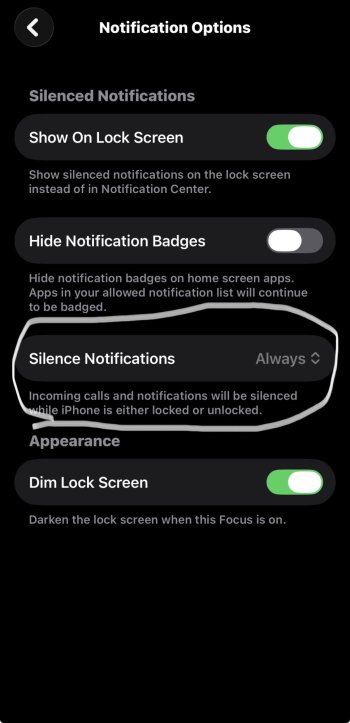
All you need to do is have the option set to Always, which will silence the notifications even when your iPhone is unlocked while having the people list empty if you don’t want any exceptions.

I don’t believe anyone else is confused with how the DND focus works or there would’ve been many posts.
 

Attachments

  • IMG_0205.jpeg
    IMG_0205.jpeg
    145.3 KB · Views: 3
  • Like
Reactions: NoBoMac
I leave my phone constantly in silent mode. Had the sound of a phone ringing personally. When a call comes in it shows on my MacBook Pro, vibrates on my Apple Watch and vibrate on my iPhone. I don't need more ways to be notified I have a call coming in. So would the simplest be to simply put your phone in silent mode?
 
It’s not confusing at all.

All you need to do is have the option set to Always, which will silence the notifications even when your iPhone is unlocked while having the people list empty if you don’t want any exceptions.

I don’t believe anyone else is confused with how the DND focus works or there would’ve been many posts.
Notifications do not include phone calls, so this will not work.
 
It says incoming calls and notifications right there on the bottom and it works just fine for me
That is correct, that is what is says. Yet, this was on, and I still received a phone call in the middle of the night yesterday while the phone was locked (which it should have blocked independently of this setting).
 
All you need to do is have the option set to Always, which will silence the notifications even when your iPhone is unlocked while having the people list empty if you don’t want any exceptions.

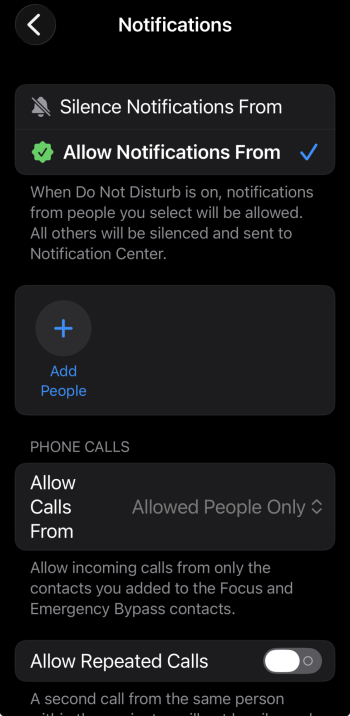
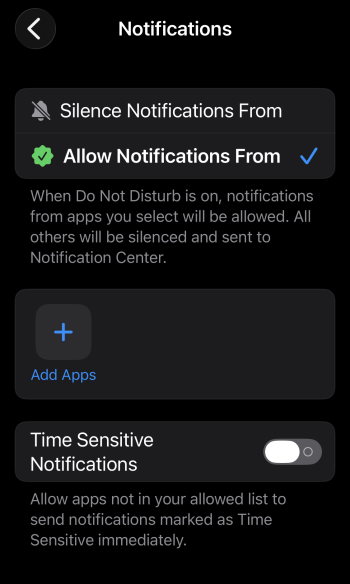
This and app list needs to exclude the phone app. And to be safe, Time Sensitive Notification under Apps should probably be off.

s1.png s2.png
 
  • Like
Reactions: ahostmadsen
It says incoming calls and notifications right there on the bottom and it works just fine for me
I just tested it. Although it says it blocks incoming calls, it does NOT. But, as the moderator suggested, if you go into people, make an empty list of allowed people, and set phone calls to ‘allowed people only’ then it blocks phone calls. I would call that confusing.
 
Last edited:
  • Love
Reactions: _Mitchan1999
I just tested it. Although it says it blocks incoming calls, it does NOT. But, as the moderator suggested, if you go into people, make an empty list of allowed people, and set phone calls to ‘allowed people only’ then it blocks phone calls. I would call that confusing.
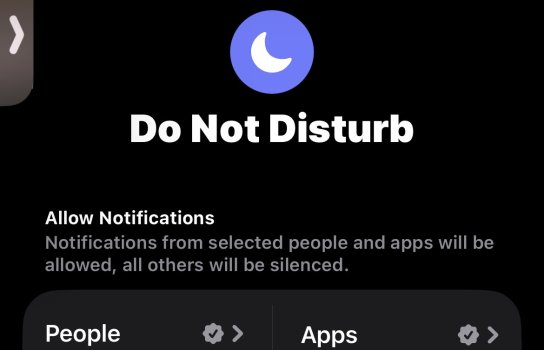
All the notifications will be silenced except those you add as exceptions.

There are two ways to add exceptions : Apps and/or People (calls & texts)

If you just want to silence everything then there can’t be any exceptions (allow list) by definition. It’s clearly mentioned right there in simple terms. I’m not sure why you’re getting confused by that.
 

Attachments

  • IMG_0207.jpeg
    IMG_0207.jpeg
    74 KB · Views: 1
Register on MacRumors! This sidebar will go away, and you'll see fewer ads.