Become a MacRumors Supporter for $50/year with no ads, ability to filter front page stories, and private forums.

biohazard6969

macrumors 6502a
Original poster
Feb 23, 2005
836
0
toronto canada
hey, i want to know if theres a way to disable the feature that open's pdf's in safari, i want them to download and open in preview becuase it is way too confusing in safari, i don't knwo how to zoom in and out or anything

thanks
 
There is a way to force Safari to download pdfs, but I don't remember it and I'm too lazy to search MR and macosxhints right now.

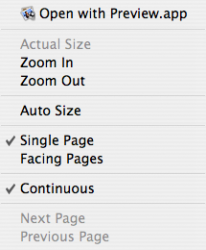
But you can do much by ctrl/right-clicking the pdf in Safari, like zooming in/out, open in Preview etc from the context menu:
 

Attachments

  • Picture 1.png
    Picture 1.png
    31.7 KB · Views: 953
When you find a link with .PDF on the end, just hold down the Option key when you click on it. Then it will be downloaded rather than opened in Safari.
 
I am trying to do the opposite

I installed Adobe Reader... long story.

I deleted it, and now Safari won't show PDF's.

How can I get that functionality back? Does anyone know? Thanks!
 
The other thing you can do, if you want to, is to install the Schubert-It plug-in for PDFs anyway. They'll still show up inline, but you get the toolbar, which makes it easier, and in particular has a button for launch-in-Preview. Although I uninstalled it and use the built-in feature...it's a preference thing. It might be a good compromise for you. :)
 
Register on MacRumors! This sidebar will go away, and you'll see fewer ads.