Become a MacRumors Supporter for $50/year with no ads, ability to filter front page stories, and private forums.

DevilDog

macrumors regular
Original poster
Dec 12, 2005
124
0
Ohio
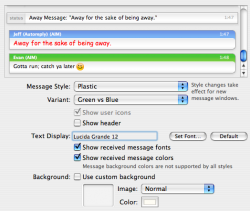
So I'm tweaking Adium and my font changes to Red. It bugs me. I can't figure out how to fix it. Now I'm really frusterated. I went to font and tried to change it there but that didn't do anything. It's just Plastic: Green vs Blue.
Ughhh... sorry for looking stupid but I'm ticked.

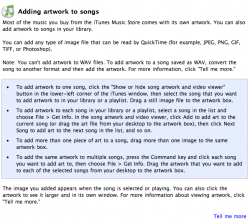
Oh, and while I'm at it, how does one clear the artwork out of iTunes? On windows all you do is right click and hit clear, but on my mac it won't do that. I got the wrong artwork in the wrong song somehow...

Thank you all.
 

Attachments

  • Picture 1.png
    Picture 1.png
    62.9 KB · Views: 113
DevilDog said:
Oh, and while I'm at it, how does one clear the artwork out of iTunes? On windows all you do is right click and hit clear, but on my mac it won't do that. I got the wrong artwork in the wrong song somehow...

Thank you all.
Edit >Clear
 
Its not in your preferences window. Close prefrences, then just click on a chat window. Go to Format->Show Colors. That should fix your problem. Let us know if it doesn't.

EDIT: The screenshot you showed... its the received text thats red, not your text. If you want to get rid of it in that window, just uncheck the box that says "Show received message colors."
 
Um, that didn't do anything, but right below it on the format menu there was a 'restore default formatting' so that fixed it.

Thank you so much. I don't know why it was bugging the he// out of me but it was...

How bout that iTunes though? I've even tried dragging the song into the trash and pulling it back out.

Even Help doesn't help.
 

Attachments

  • Picture 2.png
    Picture 2.png
    69 KB · Views: 82
DevilDog said:
How bout that iTunes though? I've even tried dragging the song into the trash and pulling it back out.
I can't tell exactly what you're trying to do in iTunes thats giving you problems. From the screenshot I assume it has something to do with the artwork associated with each song? Or are you just trying to delete songs? :confused:

EDIT: Opps, I see it in the OP. Fistful answers below.
 
I did figure out how to solve the problem, but for the sake of debate...

Unless you have some preference changed that I don't know about...

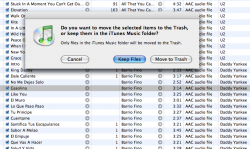
If I have a song from a playlist selected and I hit clear, it removes the song from the playlist.

If I have a song from my library selected and I hit clear, this comes up:
 

Attachments

  • Picture 1.png
    Picture 1.png
    121.7 KB · Views: 68
I'm not aware of the "clear" method (on a Mac) myself, other than for deleting tracks. I use the two Get Info methods posted above.

There are some third party apps that are supposed to help with managing artwork in iTunes (not the program's strongest suit it has to be said), like iTunes Catalog, but for large libraries I've found all that I've tried to date to be more trouble than they're worth.
 
I agree with DevilDog, iTunes help is useless, and using the "Clear" menu is the same as hitting delete.

It took me a little while to learn how to erase iTunes Artwork as well, I didn't always get the right album Art.

And Adium, well, give it time to become a 1.0, because I still have problems with it that I can't do much about.
 
Regarding Clear, it only seems to work if you have the Artwork tab of Get Info open (in which case you could probably just use the Delete button). Of course, there may be other situations too.
 
Hi all!
I've another question about Adium!
I don't what I have done, but now I can't see my contact's nick in my contact's list, only their mail. I've looked for changing it but I'm not able to find the way. Can someone help me, please??

THANKS!


-------------

//*//
 
Register on MacRumors! This sidebar will go away, and you'll see fewer ads.