Become a MacRumors Supporter for $50/year with no ads, ability to filter front page stories, and private forums.

likepeas

macrumors newbie
Original poster
Sep 8, 2007
7
0
i turned on my macbook but all I could get was the beachball, nothing would respond. So I figured it needed a reboot,( I had a lot of programs running), so I held the power switch down until it shut off. Then I restarted it. It chimed and went to the white screen, then just stopped. After about a minute this gray folder icon with a question mark started flashing on the white screen. I've never seen that before, but it can't be good.

Anybody know what to do next? and the macbook that i have is not mine its my schools. :confused:
 
The flashing question mark means it can't find the system folder.

Try restarting whilst holding the Option (Alt) key down. This might bring up the screen where you can choose system folders.

Or, if you have the install discs, boot from the discs and reselect the HD as the startup drive.
 
probably having a hard drive go out on you... that or ram


if u have an external enclosure, u should take your hdd out, put it in there and backup before u try to troubble shoot anymore

... u dont have the recalled apple 7200rpm drive do u?
 
The flashing question mark means it can't find the system folder.

Try restarting whilst holding the Option (Alt) key down. This might bring up the screen where you can choose system folders.

Or, if you have the install discs, boot from the discs and reselect the HD as the startup drive.

so is that like pressing the APPLE + the alt key dow.
so i will hold down 2 keys and press the shutdown button ?
and i dont have a startup disk.
 
the OPTION thing failed. it only shows a mouse. is there anyway to fix it or is the CD the only option.
 
so is that like pressing the APPLE + the alt key dow.
so i will hold down 2 keys and press the shutdown button ?
and i dont have a startup disk.

Just the alt key (option) on its own. Your startup disk is your hard drive since all the operating system contents are stored on it.

Do you own any other Macs at all? If you did, you could hook up your MacBook to one and hold down "T" (target disk mode) which mounts your MacBook's hard drive onto whatever Mac you have it connected to (by Firewire).

If not, you could take it to your local Apple Store or PC Store and beg them to let you plug it into one of their display computers.
 
Run the Apple Hardware Test -- see this:

http://docs.info.apple.com/article.html?artnum=303605

(Basically, hold "d" while booting).


was holding " D " and pressed the on button. but nothing still goes to the " ?:apple: "

Just the alt key (option) on its own. Your startup disk is your hard drive since all the operating system contents are stored on it.

Do you own any other Macs at all? If you did, you could hook up your MacBook to one and hold down "T" (target disk mode) which mounts your MacBook's hard drive onto whatever Mac you have it connected to (by Firewire).

If not, you could take it to your local Apple Store or PC Store and beg them to let you plug it into one of their display computers.
cool. what firewire a normal USB or something special ?
 
Oh, I'm sorry, I thought for some reason that this didn't need an install disc. It looks like it does. Never mind.

I would suspect either the hard drive, or the SATA controller. The only way to tell for sure which, though, is to either get an external enclosure or another hard drive. So I think it's time you contact Apple.

As for plugging it into another mac to test the hard drive / boot it off the other mac's drive, you just need a standard firewire cable with the same six pin interface that goes into your Mac on both ends.
 
Oh, I'm sorry, I thought for some reason that this didn't need an install disc. It looks like it does. Never mind.

I would suspect either the hard drive, or the SATA controller. The only way to tell for sure which, though, is to either get an external enclosure or another hard drive. So I think it's time you contact Apple.

As for plugging it into another mac to test the hard drive / boot it off the other mac's drive, you just need a standard firewire cable with the same six pin interface that goes into your Mac on both ends.

so that would be USB 2.0
 
so that would be USB 2.0

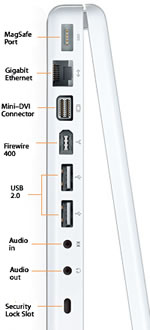
No... Firewire is a different kind of connection. It isn't USB anything, although it serves a similar purpose. Look at this picture:

macbook-ports.jpg


It's the one that's angled on one side (labeled).
 
thx man. and some how i on the macbook for like 10minutes and the bottow is freaking HOT.
 
It will heat up - all laptops get warm/hot.

Depends what you are doing on it, I'd be concerned if it was heating up when you were just browsing the net though.
 
yeah. i just on the mac. leave it on the net and it heats up. well i used it from like 10pm to like 5 am and that it suddenly lagged and (refers to post 1) yeah so like. what ya think happened ?
 
Register on MacRumors! This sidebar will go away, and you'll see fewer ads.