Become a MacRumors Supporter for $50/year with no ads, ability to filter front page stories, and private forums.

Tex-Twil

macrumors 68030
Original poster
May 28, 2008
2,501
15
Berlin
Hi,
I'm playing around with iWeb to make a small site but when I was testing it, I realized that the fonts or Windows look different. I use the default template font Helvetica Neue but it is not displayed correctly on windows. Is it supposed to be web safe ?

If not which other font could I use to get the same design on Win and OSX ? Why is Apple using non websafe fonts in their template ?

Thanks,
Tex
 
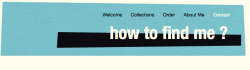
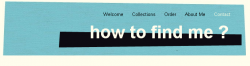
Ah I forgot it include the screenshots. Left OSX, right Windows. It looks like it is a different font.
 

Attachments

  • Screen shot 2010-06-20 at 1.39.48 PM.png
    Screen shot 2010-06-20 at 1.39.48 PM.png
    113.9 KB · Views: 365
  • Screen shot 2010-06-20 at 1.40.54 PM.png
    Screen shot 2010-06-20 at 1.40.54 PM.png
    108.9 KB · Views: 412
Helvetica is not part of any Windows default font set, so Windows users are likely to see a substitute font. If that's a concern, avoid Helvetica.

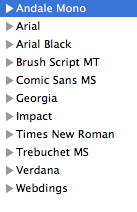
There's a collection in Font Book labelled "Web", which gives the following list of common fonts. However, even those are not always available on Windows machines.
 

Attachments

  • fonts.png
    fonts.png
    12.7 KB · Views: 13,753
Only 7% of Windows users and 26% of Linux users have Helvetica installed. Much more common is Arial. If you create a css font stack I would use:

Arial, "Arial Unicode MS", Helvetica, "Helvetica Neue", HelveticaNeue, "Nimbus Sans L", FreeSans, "Liberation Sans", sans-serif;
 
Only 7% of Windows users and 26% of Linux users have Helvetica installed. Much more common is Arial. If you create a css font stack I would use:

Arial, "Arial Unicode MS", Helvetica, "Helvetica Neue", HelveticaNeue, "Nimbus Sans L", FreeSans, "Liberation Sans", sans-serif;
ok. Thing is that iWeb allows very little customization so I will have to modify the generated css.

Thanks
 
Only 7% of Windows users and 26% of Linux users have Helvetica installed. Much more common is Arial. If you create a css font stack I would use:

Arial, "Arial Unicode MS", Helvetica, "Helvetica Neue", HelveticaNeue, "Nimbus Sans L", FreeSans, "Liberation Sans", sans-serif;

I think that's going to be a waste of time as 99.99% of everyone will have Arial installed, so they all will see Arial.
 
If not which other font could I use to get the same design on Win and OSX ? Why is Apple using non websafe fonts in their template?

Because built-in fonts in Windows suck big time, that's why. Should we also open a back door for Windows viruses to get the same experience the Windows people have? Should the app developers not use advanced OSX features such as Grand Central just because the competition does not have it?

Sorry about the rant but I'm fed up with thinking about Windows compatibility (or even worse, Idiot Exploder compatibility...)
 
Because built-in fonts in Windows suck big time, that's why. Should we also open a back door for Windows viruses to get the same experience the Windows people have? Should the app developers not use advanced OSX features such as Grand Central just because the competition does not have it?

Sorry about the rant but I'm fed up with thinking about Windows compatibility (or even worse, Idiot Exploder compatibility...)
I don't see what viruses have to do with this conversation ...

Anyway, I asked because I want to design a page which will look great on all platforms and I don't care about a OSX vs Windows fight. It looks like there are very few fonts which are actually cross OS compatible so I see now why iWeb uses OSX fonts only.

I also found this article which show that I can map my OSX font to another one on PC. I haven't tried it yet but it will probably resolve my issues.

cheers,
Tex
 
You can try to embed the typeface using @font-face in the CSS style for those browsers that now, and will, support it. You will have to buy the font however from one of the foundaries that specify in the licensing that you're able to do so. I've been designing recently for a fairly large news organisation, and this is one approach being considered.
Some background: http://www.css3.info/preview/web-fonts-with-font-face/
Also a great article from A List Apart: http://www.alistapart.com/articles/cssatten

What is kind of interesting, @font-face isn't a CSS3 new thing, but was originally introduced in CSS2! IE4 actually had capability of sorts to support this, even though when CSS2.1 came around, it was removed. Firefox 3.5 and later supports it.

Arial is a much more common font on PC's, and the two typefaces are fairly similar. You probably won't get into this much detail as I have, but just a bit fun knowledge, almost all fonts are rendered differently on PC or Mac, and browsers render fonts differently as well. No surprise that Safari actually does the best with line-height etc. For most websites, the discrepancies aren't an issue however for most websites. Also note, Helvetica looks awful on PC...

Only 7% of Windows users and 26% of Linux users have Helvetica installed. Much more common is Arial. If you create a css font stack I would use:

Arial, "Arial Unicode MS", Helvetica, "Helvetica Neue", HelveticaNeue, "Nimbus Sans L", FreeSans, "Liberation Sans", sans-serif;
If you still want to use Helvetica, I would avoid this recommendation entirely. Otherwise not one user will see Helvetica, even if they have it lol, as Arial will be selected 99% of the time =) !

I would use this if I were you: Helvetica, "Helvetica Neue", Arial, sans-serif;

Some reading: http://meiert.com/en/blog/20080220/helvetica-arial/
Further reading on font availability: http://www.awayback.com/revised-font-stack/
How to create good font stacks: http://unitinteractive.com/blog/2008/06/26/better-css-font-stacks/


 
Helvetica renders very poorly on MS Windows. Your website will look awful for a lot of people. For mac users it is recommended to disable Arial. This way mac users will see Helvetica instead of Arial on the whole web...
 
The font "Helvetica" doesn't display well on the web, anywhere. "Helvetica Neue", on the other hand, does. Use this font stack:

font-family: "Helvetica Neue", Arial, sans-serif;

In this case Mac users will see the best-rendering, most appropriate font for them; everyone else will see Arial.
 
The font "Helvetica" doesn't display well on the web, anywhere. "Helvetica Neue", on the other hand, does. Use this font stack:

font-family: "Helvetica Neue", Arial, sans-serif;

In this case Mac users will see the best-rendering, most appropriate font for them; everyone else will see Arial.

Helvetica Neue, sounds new but is not as good as the original. The only advantage is the size of the family. But we are not using any light version here ;-)

Btw, it is a display type, not so good for body text... but that is a complete different story :)
 
You can try to embed the typeface using @font-face in the CSS style
ok, this seems to be the best solution.

How do I know if I have the rights to use/embed a font of my OS (Helvetica here).

There are tools which allows me to convert the .dfont format to otf but I don't know if that's legal.

EDIT: I've just tried and it works everywhere (Linux/OSX/Windows, FF, Safari, Chrome) but not in IE8. Even if I used the EOT file type.
 
You should use Arial regardless because it renders better on screen, Helvetica is wonky looking at small sizes.
with a size 14 it looks pretty nice on all browser?OSs. But I'm still fighting with IE8. I found another article which explains font-face in browsers but my IE8 just does not react.

I have this css:

HTML:
@font-face{
  font-family: 'HelveticaNeue';
  src: url('HelveticaNeueLTPro-Roman.eot'); 

}

@font-face{
  font-family:'HelveticaNeue';
  src: url('HelveticaNeueLTPro-Roman.otf') format('opentype'); 
}

IE8 shows everything in Arial ..

I even had a look at what is going on the network and IE downloads correctly the font:
Code:
GET /~tex/fonttest/css/HelveticaNeueLTPro-Roman.eot HTTP/1.1
Accept: */*
Referer: http://192.168.0.2/~jan/fonttest/
Accept-Language: en-US
UA-CPU: x86
Accept-Encoding: gzip, deflate
User-Agent: Mozilla/4.0 (compatible; MSIE 7.0; Windows NT 5.1; .NET CLR 2.0.50727)
Host: 192.168.0.2
Connection: Keep-Alive

HTTP/1.1 200 OK
Date: Thu, 24 Jun 2010 21:32:20 GMT
Server: Apache/2.2.14 (Unix) mod_ssl/2.2.14 OpenSSL/0.9.8l DAV/2
Last-Modified: Thu, 24 Jun 2010 20:50:53 GMT
ETag: "1e9b67-a9d2-489cccf69e540"
Accept-Ranges: bytes
Content-Length: 43474
Keep-Alive: timeout=5, max=98
Connection: Keep-Alive
Content-Type: application/vnd.ms-fontobject

EDIT: maybe my eot file is corrupt or something. I tried with another eot file from the article and it works :s

EDIT2: yes, the converted EOT file was not ok. I tried another converter which worked !
 
Arial, "Arial Unicode MS", Helvetica, "Helvetica Neue", HelveticaNeue, "Nimbus Sans L", FreeSans, "Liberation Sans", sans-serif;

That font stack is way too overloaded, too many fonts and too many fonts that most users won't have. And give the font you prefer to display precedence. :)

Better would be this
"Helvetica Neue", Arial, sans-serif;

In this case Mac users will see the best-rendering, most appropriate font for them; everyone else will see Arial.

Font stacks work from the top most desired backwards; Desired > Alternative > Common > Generic. In this case, Arial is a close alternative to Helvetica whilst also being very common, so you only need to specify the two.


Or you can use something like Typekit or the Google Font Directory.
I find TypeKit has a better selection, but slow load times. Maybe it's just me. Google Fonts load quick, but the selection is stinkin' slim :( It's safe (as safe as you want to get) to embed your own using @font-face, and checking out a place like Font Squirrel which catalogues license-free typefaces.
 
That font stack is way too overloaded, too many fonts and too many fonts that most users won't have. And give the font you prefer to display precedence. :)

You forget Linux. And if a user has a font, the webbrowser won't look any further. You do not want to put the most desired one as first in the font stack in all cases. You also have to consider consistency and render quality on different platforms.
 
I find TypeKit has a better selection, but slow load times. Maybe it's just me. Google Fonts load quick, but the selection is stinkin' slim :( It's safe (as safe as you want to get) to embed your own using @font-face, and checking out a place like Font Squirrel which catalogues license-free typefaces.

Yeah Font Squirrel has some good stuff. I've been able to find enough good fonts on TypeKit to make it worth my while and the free account level is plenty for me right now (and I don't mind the tiny TK tag in the lower right-hand corner, either). I've not had any problems with load times so far.
 
Can you explain this further? Why in the world would you want a less desirable font to be displayed first?

Because, as I wrote, you could prefer a more consistent look or the preferred fonts are not rendered very good on different platforms (e.g. Helvetica).
 
Register on MacRumors! This sidebar will go away, and you'll see fewer ads.