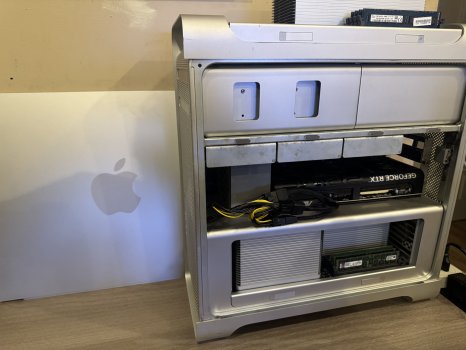
Hello all, at Greg Gant’s suggestion I have done a small write up on my computer: mid-2012 5,1 Mac Pro Dual X5690, w/48GB of ram (6x8) in triple channel, and a RTX 5080 fully working in Windows 10. I have replaced my brand new Thinkpad P16 G2 w/ADA-3500 GPU with this 13 year old cMP! I did nothing truly out of the ordinary with it, but I’ve been informed that this is the first 5080 to find itself in a 5,1. Buckle up, because I write dry.
TLDR: Enable GOP in firmware, UEFI Windows, unmodded card, double Pixlas.
Hardware modifications:
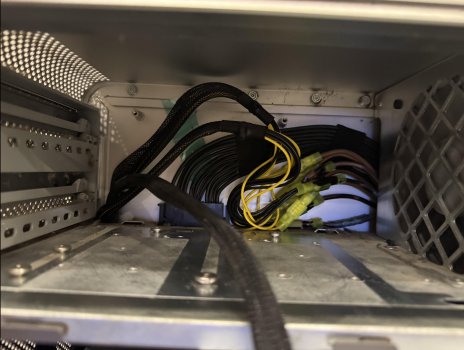
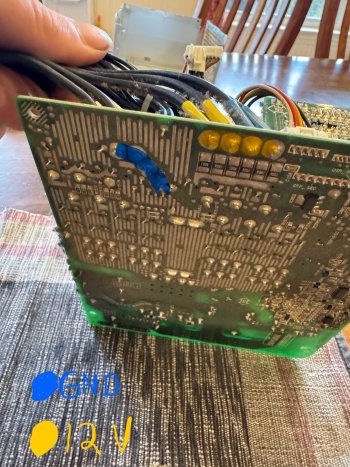
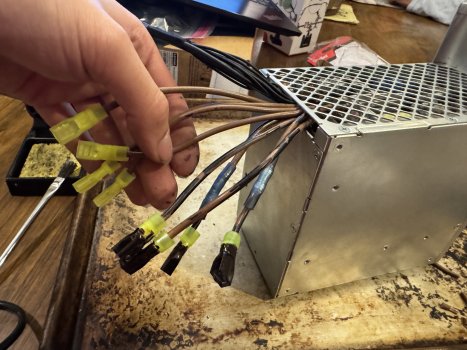
I have done a double “Pixlas Mod” consisting of two mod cables (each cable has two 8 pin connectors) for a total of four available 8 pin connectors. I soldered directly to the outputs and grounds (4 each, the same places the stock board connectors draw from) of the Delta DPS-980BB-2A PSU. Out of the PSU I have four 12v wires and four GND wires. (NOTE: Delta used an extremely high temp solder and a sufficiently high temp iron is required). I then used insulated spade style disconnects for the connections to the mod cables. The 12v and ground wires are wired into the disconnects in a way that helps spread the load, it’s not just one 8 pin per 12v/ground wire. The cables feed into the NVIDIA supplied (3)8pin X (1)12VHPWR adapter with one 8 pin left over unused.
A “standard” double pixlas installation would probably suffice, but I was put off by the amount of crimp T connections that would be required. Lots of butchering of the power cable.
An external Bluetooth antenna was added as (no joke) something about the 5080 killed my BT range. I did not upgrade the airport card, this is the stock separate Bluetooth.
Firmware modification:
I am running 144.0.0.0.0 with Enable GOP. Enable GOP in firmware is critical to the 5080 working. I do get complete boot screen/picker support with this setup.
Windows:
Windows 10 UEFI installation via OCLP with boot folder removed, legacy bios is not compatible with the 5080, this goes for any computer. NVIDIA drivers installed from Windows nothing different there.
(Note: MacOS does boot but with no Hardware acceleration due to no available drivers)
I use Process Lasso’s “ProBalance” feature to make better use of the multicore performance in the dual CPU system. It actively (and automatically without having to ever open the program) changes core affinities for processes which helps to mitigate single core performance bottlenecking. For games like beamng this is very helpful. Also helpful for general system performance.
The GPU:
An ASUS PRIME GeForce RTX 5080 16GB OC, entirely unmodified, stock VBIOS. After a couple days of use I did over clock/undervolt it in MSI afterburner for some extra performance (my draw did not go down since it was both an OC and an undervolt), but around 3+Ghz the performance goes down (I assume due to system limitations). I have mine at 3045Mhz/955mV.
The card was chosen for its length (12in) and for its airflow design (more compatible with the cMP’s airflow design) which was better than the Founders Edition for this use case.
Power draw:
(Measured with a KillAWatt P3 at the outlet)
Idle- 210-230w
Gaming- 350-575w
The Benchmarks Below- 450-625w
Artificial load on everything (MAX)- 775-805w
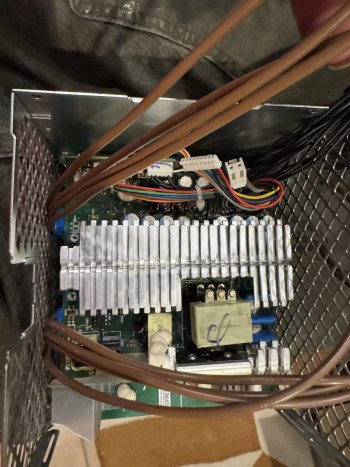
PSU Temps stay at or below 41c even during artificial load using MacsFanControl with the PSU fan bound to PSU Sensor 2 with a 32/40c fan curve. Below 300w draw the PSU fan is below 1000rpm, which is inaudible. Before final reassembly I cleaned the PSU and PSU fan, so they are completely free of dust. I am trying to be over protective of this PSU, I could probably get away with a less aggressive fan curve but I don’t want to chance it.
Anything over a 5080 would require an external PSU, but I’d be very interested to see the results.
Performance:
Games I have tried are BeamNG.Drive, and Snowrunner, which run at 4K60 smoothly with High/Ultra settings (with the exception of Snowrunner’s terrain draw distance and shadow settings, which are at Medium. Barely any visual difference. This is due to bus limitations. Snowrunner is bus bound). I have also tried GTA V Expanded & Enhanced, which was a challenge. If I gave up on ray tracing I could max every setting. But with ray tracing (this isn’t a card issue, is a system issue) I had to be incredibly careful not to overload, or else my utilizations would go down and the fps with them. The gameplay recording is with ray tracing enabled. And no DLSS or any cheating!
Gaming above 80fps results in exponentially more bus/cpu bound issues as I go higher. This is not a machine for 120fps shooters. 60fps is the sweet spot. Note that some of the benchmarks ran at 110+ fps at times, which slightly dinged the score due to what I’ve just described.
(Edit: Assetto Corsa runs at over 400FPS with stock graphics settings, in 4K. So I think the roll off is dependent on system load. If everything has room it seems it can go high. More testing is required)
Here are some benchmarks I have done:
3D Mark - Time Spy http://www.3dmark.com/spy/59388284
3D Mark - Steel Nomad Vulkan http://www.3dmark.com/sn/9371900
3D Mark - Steel Nomad DX12 http://www.3dmark.com/sn/9371848
3D Mark - Speed Way http://www.3dmark.com/sw/2818561
3D Mark - Port Royal http://www.3dmark.com/pr/3682348
I spent hours making a performance overlay for this machine for these videos, everything is reading correctly on it besides my Max,Min,Avg,01%,.1% column, as you can probably tell. Seems to be an issue with the reporting. The FPS in the graph and the graph itself are correct as they use a different source.
My apologies for the recording quality, I think the system is at its limits and the recording takes the fall. You’ll have to trust the FPS graph. I told it to record at 60, and I think it was trying its best! I need an external capture device I think. When the bus isn’t saturated to the point it’s dripping bits, the recording smoothens out
BeamNG Gameplay 4K -
Snowrunner Gameplay 4K -
GTA V Expanded & Enhanced 4K -
(Note: The recording came out better for this one, I am not sure why, the game seems to be utilizing the system differently.)
(Note: screen recording adds 5-10% to reported GPU usage)
TLDR: Enable GOP in firmware, UEFI Windows, unmodded card, double Pixlas.
Hardware modifications:
I have done a double “Pixlas Mod” consisting of two mod cables (each cable has two 8 pin connectors) for a total of four available 8 pin connectors. I soldered directly to the outputs and grounds (4 each, the same places the stock board connectors draw from) of the Delta DPS-980BB-2A PSU. Out of the PSU I have four 12v wires and four GND wires. (NOTE: Delta used an extremely high temp solder and a sufficiently high temp iron is required). I then used insulated spade style disconnects for the connections to the mod cables. The 12v and ground wires are wired into the disconnects in a way that helps spread the load, it’s not just one 8 pin per 12v/ground wire. The cables feed into the NVIDIA supplied (3)8pin X (1)12VHPWR adapter with one 8 pin left over unused.
A “standard” double pixlas installation would probably suffice, but I was put off by the amount of crimp T connections that would be required. Lots of butchering of the power cable.
An external Bluetooth antenna was added as (no joke) something about the 5080 killed my BT range. I did not upgrade the airport card, this is the stock separate Bluetooth.
Firmware modification:
I am running 144.0.0.0.0 with Enable GOP. Enable GOP in firmware is critical to the 5080 working. I do get complete boot screen/picker support with this setup.
Windows:
Windows 10 UEFI installation via OCLP with boot folder removed, legacy bios is not compatible with the 5080, this goes for any computer. NVIDIA drivers installed from Windows nothing different there.
(Note: MacOS does boot but with no Hardware acceleration due to no available drivers)
I use Process Lasso’s “ProBalance” feature to make better use of the multicore performance in the dual CPU system. It actively (and automatically without having to ever open the program) changes core affinities for processes which helps to mitigate single core performance bottlenecking. For games like beamng this is very helpful. Also helpful for general system performance.
The GPU:
An ASUS PRIME GeForce RTX 5080 16GB OC, entirely unmodified, stock VBIOS. After a couple days of use I did over clock/undervolt it in MSI afterburner for some extra performance (my draw did not go down since it was both an OC and an undervolt), but around 3+Ghz the performance goes down (I assume due to system limitations). I have mine at 3045Mhz/955mV.
The card was chosen for its length (12in) and for its airflow design (more compatible with the cMP’s airflow design) which was better than the Founders Edition for this use case.
Power draw:
(Measured with a KillAWatt P3 at the outlet)
Idle- 210-230w
Gaming- 350-575w
The Benchmarks Below- 450-625w
Artificial load on everything (MAX)- 775-805w
PSU Temps stay at or below 41c even during artificial load using MacsFanControl with the PSU fan bound to PSU Sensor 2 with a 32/40c fan curve. Below 300w draw the PSU fan is below 1000rpm, which is inaudible. Before final reassembly I cleaned the PSU and PSU fan, so they are completely free of dust. I am trying to be over protective of this PSU, I could probably get away with a less aggressive fan curve but I don’t want to chance it.
Anything over a 5080 would require an external PSU, but I’d be very interested to see the results.
Performance:
Games I have tried are BeamNG.Drive, and Snowrunner, which run at 4K60 smoothly with High/Ultra settings (with the exception of Snowrunner’s terrain draw distance and shadow settings, which are at Medium. Barely any visual difference. This is due to bus limitations. Snowrunner is bus bound). I have also tried GTA V Expanded & Enhanced, which was a challenge. If I gave up on ray tracing I could max every setting. But with ray tracing (this isn’t a card issue, is a system issue) I had to be incredibly careful not to overload, or else my utilizations would go down and the fps with them. The gameplay recording is with ray tracing enabled. And no DLSS or any cheating!
Gaming above 80fps results in exponentially more bus/cpu bound issues as I go higher. This is not a machine for 120fps shooters. 60fps is the sweet spot. Note that some of the benchmarks ran at 110+ fps at times, which slightly dinged the score due to what I’ve just described.
(Edit: Assetto Corsa runs at over 400FPS with stock graphics settings, in 4K. So I think the roll off is dependent on system load. If everything has room it seems it can go high. More testing is required)
Here are some benchmarks I have done:
3D Mark - Time Spy http://www.3dmark.com/spy/59388284
3D Mark - Steel Nomad Vulkan http://www.3dmark.com/sn/9371900
3D Mark - Steel Nomad DX12 http://www.3dmark.com/sn/9371848
3D Mark - Speed Way http://www.3dmark.com/sw/2818561
3D Mark - Port Royal http://www.3dmark.com/pr/3682348
I spent hours making a performance overlay for this machine for these videos, everything is reading correctly on it besides my Max,Min,Avg,01%,.1% column, as you can probably tell. Seems to be an issue with the reporting. The FPS in the graph and the graph itself are correct as they use a different source.
My apologies for the recording quality, I think the system is at its limits and the recording takes the fall. You’ll have to trust the FPS graph. I told it to record at 60, and I think it was trying its best! I need an external capture device I think. When the bus isn’t saturated to the point it’s dripping bits, the recording smoothens out
BeamNG Gameplay 4K -
Snowrunner Gameplay 4K -
GTA V Expanded & Enhanced 4K -
(Note: The recording came out better for this one, I am not sure why, the game seems to be utilizing the system differently.)
(Note: screen recording adds 5-10% to reported GPU usage)
Attachments
Last edited: