

Got a tip for us?
Let us know
Become a MacRumors Supporter for $50/year with no ads, ability to filter front page stories, and private forums.
tyring to install monterey - Reduced Security software update failed.
- Thread starter gabakusa
- Start date
- Sort by reaction score
You are using an out of date browser. It may not display this or other websites correctly.
You should upgrade or use an alternative browser.
You should upgrade or use an alternative browser.
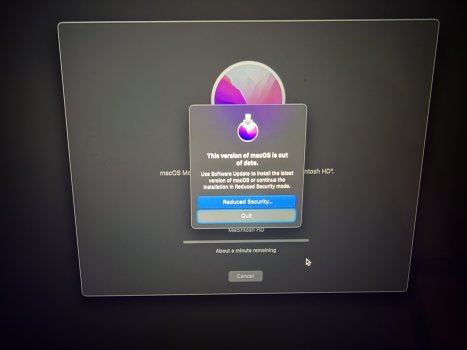
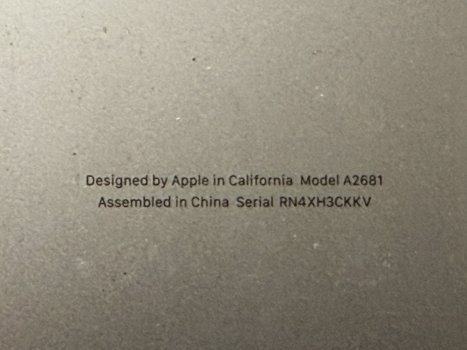

MBA M2 require Monterey 12.4 minimum. Are you trying to install macOS on external drive? More details please.
i was to installing it in the internal SSDMBA M2 require Monterey 12.4 minimum. Are you trying to install macOS on external drive? More details please.
Last edited:

Are you installing from the online source?
I suspect you aren’t going through the security-lowering process properly.
It took me a few tries, a while back, to install soundcard drivers from 2012.
I suspect you aren’t going through the security-lowering process properly.
It took me a few tries, a while back, to install soundcard drivers from 2012.
So you have booted in Recovery? You shouldn't have to reduce security settings in order to reinstall macOS from Recovery.i was to installing it in the internal SSD
How to reinstall macOS - Apple Support
Use macOS Recovery, your computer’s built-in recovery system, to reinstall the Mac operating system.

Are you sure it is possible? Honestly, I do not think it can be done.
It shipped with macOS S̶e̶q̶u̶o̶i̶a̶. (my mistake)
downgrade to monterey - Apple Community
It shipped with macOS S̶e̶q̶u̶o̶i̶a̶. (my mistake)
downgrade to monterey - Apple Community
Last edited:
Anything is possible, but will require an external boot drive.Are you sure it is possible? Honestly, I do not think it can be done.
It shipped with macOS Sequoia.
downgrade to monterey - Apple Community

i am using apple original software monterey, i was able to install ventura, but it wont go any older than thatAre you installing from the online source?
I suspect you aren’t going through the security-lowering process properly.
It took me a few tries, a while back, to install soundcard drivers from 2012.
yes i am booting up in recovery mode and it goes %90 then it will stopSo you have booted in Recovery? You shouldn't have to reduce security settings in order to reinstall macOS from Recovery.
How to reinstall macOS - Apple Support
Use macOS Recovery, your computer’s built-in recovery system, to reinstall the Mac operating system.support.apple.com
You probably have leftovers from Ventura recovery partition. To do a clean install, you have to do it with Apple Configurator. There is no other way, because boot firmware is directly on internal ssd in sealed partition that can only be upgraded (not downgraded) by regular install process.
You need Apple Configurator + cable + another Mac + firmware restore ipsw files with Monterey.
You need Apple Configurator + cable + another Mac + firmware restore ipsw files with Monterey.
It can be done, but you would need to 100% erase the drive, including all partitions. I don’t think a boot-drive would do that. You will probably need another Mac to do it.i am using apple original software monterey, i was able to install ventura, but it wont go any older than that
Yes, absolutely.
If you have successfully installed Ventura, and want to go back to Monterey, then the Ventura system drive, including all partitions, must be erased first.
You can't do a downgrade install, as @Solarflares mentioned, you have to erase all the partitions on the drive,too.
You would use Configurator, with a second Mac, to do the firmware install on your MBAir, then the "new" full install of the older Monterey.
(Why are you wanting to go back to an older system? (Just curious))
If you have successfully installed Ventura, and want to go back to Monterey, then the Ventura system drive, including all partitions, must be erased first.
You can't do a downgrade install, as @Solarflares mentioned, you have to erase all the partitions on the drive,too.
You would use Configurator, with a second Mac, to do the firmware install on your MBAir, then the "new" full install of the older Monterey.
(Why are you wanting to go back to an older system? (Just curious))
in the second mac i have 26.2 and it wont allow me to install monterey in the second machine only 26.2 using DFUYes, absolutely.
If you have successfully installed Ventura, and want to go back to Monterey, then the Ventura system drive, including all partitions, must be erased first.
You can't do a downgrade install, as @Solarflares mentioned, you have to erase all the partitions on the drive,too.
You would use Configurator, with a second Mac, to do the firmware install on your MBAir, then the "new" full install of the older Monterey.
(Why are you wanting to go back to an older system? (Just curious))
i did delete all the partitions and with a bootable USB i tried to install monterey and i got the message you see and it wont move forward

if you want to downgrade a silicon mac you need to do DFU restore, from my experience, i could be wrong but I couldnt do it without DFU, it's quite easy to do (not the first time he he  but you do need another Mac
have tried all the earasing mumbo jumbo, but that wont work, as usual Appe makes downgrades difficult, downgraded my M1 iMac to Monterey, because everything just bloody works, excpet phone mirroring, and HOME doesnt work, and apple pay wont work,
Tahoe kept ejecting one USB drive for no reason, out of 6 drives connected, was super weird but frustrating to diagnose
but you do need another Machave tried all the earasing mumbo jumbo, but that wont work, as usual Appe makes downgrades difficult, downgraded my M1 iMac to Monterey, because everything just bloody works, excpet phone mirroring, and HOME doesnt work, and apple pay wont work,
Tahoe kept ejecting one USB drive for no reason, out of 6 drives connected, was super weird but frustrating to diagnose
Last edited:
Register on MacRumors! This sidebar will go away, and you'll see fewer ads.