
Become a MacRumors Supporter for $50/year with no ads, ability to filter front page stories, and private forums.

CoastalOR

macrumors 68040
Original poster
1Password would not launch on our 3 Macs this morning. I got this error:
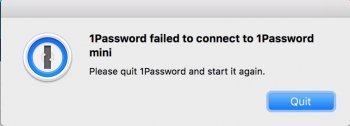
1Password 6001.jpg

Agilebits knows about the problem and 1Password 6.5.5 has to be downloaded and installed. Here is a link to information about the error that includes a link to download 1Password 6.5.5:
https://support.1password.com/error-connect-to-mini/
 
  • Like
Reactions: Weaselboy
I did see this a little while ago, I have did as stated on their site and was able to start 1password. Ok now.
It took me awhile to figure out how to fix the problem. The error I got, see my op, did not have the "Learn more" button. The only choice was "Quit". I restarted my MBP (running OS 10.12.3) multiple times, logged in to my other User account, and booted to Safe mode all with no solution. I was considering doing a NVRAM and SMC resets or even reinstalling Sierra. Fortunately, before going any further, I started to suspect a AgileBits issue, so I thought I would see if there was the same problem on the other Macs. I started my wife's MBP (OS 10.10.5) and the error window did have the "Learn more" button, so then I was on my way to fixing the problem.

It was good that AgileBits was on the problem and got a fix out quickly. I am disappointed that AgileBits had such a major problem that caused NO access to 1Passwords needed passwords and, in my case, no notification to the User since I did not have the "Learn more" button.
 
Register on MacRumors! This sidebar will go away, and you'll see fewer ads.