

I think most of us have dealt with this at some point: an email address gets leaked, spam increases, and the provider mostly catches it before we ever see it. Annoying, but manageable.
The problem is calendar invitations attached to junk messages. Most mail/calendar providers handle this sensibly. If the message is in Spam or Junk, the providers' calendar does not treat the attached invitation as something worth surfacing.
Apple Calendar on iOS and iPadOS does the opposite. It scans all mail folders, including Junk/Spam, and automatically surfaces unresponded calendar invitations as tentative events. That means spam content can create a badge on the Calendar app, appear in the invitation list, show up on the calendar itself, trigger Time Sensitive alerts, appear in widgets, and even surface prominently in CarPlay. That is not only irritating but a serious user-safety design problem!
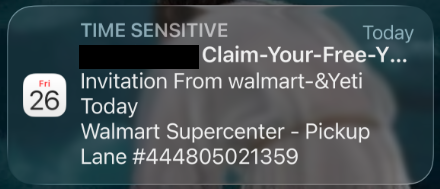
To be clear, I am not talking about spam calendars that users accidentally subscribed to. This is different. These are calendar invitations attached to junk email messages that the mail provider has already quarantined. It's not specific to any one mail provider either. Mail knows these are junk folders. Calendar should not be promoting their contents into system-level calendar surfaces.
The removal process is also a problem. Apple’s documentation says to open the event and tap “Delete Event,” with references to reporting junk in some cases. But that option does not exist for these unresponded mail-based invitations. The obvious action for many users, especially less technical users, is to decline the invitation. That removes it from view, but it also confirms activity to the spammer and can make the spam problem worse. The only reliable workaround I have found is to delete the originating junk email or disable Calendar for the account entirely. Neither is a reasonable solution.
Apple did not create calendar spam, but iOS and iPadOS make this specific version of it much worse by surfacing junk-folder invitations in high-visibility places while giving users no clear “delete without responding” option.
The fix seems so straightforward. Apple Calendar: Do not index or surface calendar invitations from system-designated Junk/Spam folders. Mail already understands which folders those are. Calendar should respect that. What's even more frustrating is the years of documented user complaints about this specific issue online.
I have reported this through Feedback Assistant under FB23164241 in 2026 and FB22144617 in 2025. As of iOS 27 developer beta 2, the issue is still present. After having dealt with this for years personally, and now recently for an aging family member, I think this issue needs to be escalated.
Thank you for attending my TED talk. 🙇♂️
But seriously, if you have seen this behavior, please report it too. This is exactly the kind of issue that is easy for Apple to ignore if it looks like one person’s edge case, even though the impact is worse for less technical users who are more likely to interact with the spam invitation the “wrong” way. This is one of those areas where the default Apple behavior should be protecting users, not amplifying malicious junk content across the system. At minimum, Apple should stop surfacing invitations from Junk/Spam folders.
The problem is calendar invitations attached to junk messages. Most mail/calendar providers handle this sensibly. If the message is in Spam or Junk, the providers' calendar does not treat the attached invitation as something worth surfacing.
Apple Calendar on iOS and iPadOS does the opposite. It scans all mail folders, including Junk/Spam, and automatically surfaces unresponded calendar invitations as tentative events. That means spam content can create a badge on the Calendar app, appear in the invitation list, show up on the calendar itself, trigger Time Sensitive alerts, appear in widgets, and even surface prominently in CarPlay. That is not only irritating but a serious user-safety design problem!
To be clear, I am not talking about spam calendars that users accidentally subscribed to. This is different. These are calendar invitations attached to junk email messages that the mail provider has already quarantined. It's not specific to any one mail provider either. Mail knows these are junk folders. Calendar should not be promoting their contents into system-level calendar surfaces.
The removal process is also a problem. Apple’s documentation says to open the event and tap “Delete Event,” with references to reporting junk in some cases. But that option does not exist for these unresponded mail-based invitations. The obvious action for many users, especially less technical users, is to decline the invitation. That removes it from view, but it also confirms activity to the spammer and can make the spam problem worse. The only reliable workaround I have found is to delete the originating junk email or disable Calendar for the account entirely. Neither is a reasonable solution.
Apple did not create calendar spam, but iOS and iPadOS make this specific version of it much worse by surfacing junk-folder invitations in high-visibility places while giving users no clear “delete without responding” option.
The fix seems so straightforward. Apple Calendar: Do not index or surface calendar invitations from system-designated Junk/Spam folders. Mail already understands which folders those are. Calendar should respect that. What's even more frustrating is the years of documented user complaints about this specific issue online.
I have reported this through Feedback Assistant under FB23164241 in 2026 and FB22144617 in 2025. As of iOS 27 developer beta 2, the issue is still present. After having dealt with this for years personally, and now recently for an aging family member, I think this issue needs to be escalated.
Thank you for attending my TED talk. 🙇♂️
But seriously, if you have seen this behavior, please report it too. This is exactly the kind of issue that is easy for Apple to ignore if it looks like one person’s edge case, even though the impact is worse for less technical users who are more likely to interact with the spam invitation the “wrong” way. This is one of those areas where the default Apple behavior should be protecting users, not amplifying malicious junk content across the system. At minimum, Apple should stop surfacing invitations from Junk/Spam folders.
