

Got a tip for us?
Let us know
Become a MacRumors Supporter for $50/year with no ads, ability to filter front page stories, and private forums.
iOS 27: All The Little Things
- Thread starter TitsLegendary
- Start date
- Sort by reaction score
You are using an out of date browser. It may not display this or other websites correctly.
You should upgrade or use an alternative browser.
You should upgrade or use an alternative browser.


adrianlondon
macrumors 604
I have two shortcuts that need to save a variable in between uses. The solution was to write the variable out to a file, and read it back in as needed.
In iOS 27, there are new actions called "Storage", and you can create a "storage" to be local to that shortcut or globally available. I've not used the latter, but I assume this means any shortcut can access it.
You could even use these to set default or hard-code values rather than have them directly in the shortcut. (You can edit them in the new Storage section.)
Click (i) at the bottom of a shortcut:

In iOS 27, there are new actions called "Storage", and you can create a "storage" to be local to that shortcut or globally available. I've not used the latter, but I assume this means any shortcut can access it.
You could even use these to set default or hard-code values rather than have them directly in the shortcut. (You can edit them in the new Storage section.)
Click (i) at the bottom of a shortcut:

bchery21
macrumors 6502a
Can someone confirm if you can manually identify/tag a person in the Photos app instead of relying on the app to do it itself?
Little Angel
macrumors member
Long press on app store icon now says app updates. Was just updates before

TheCart
macrumors regular
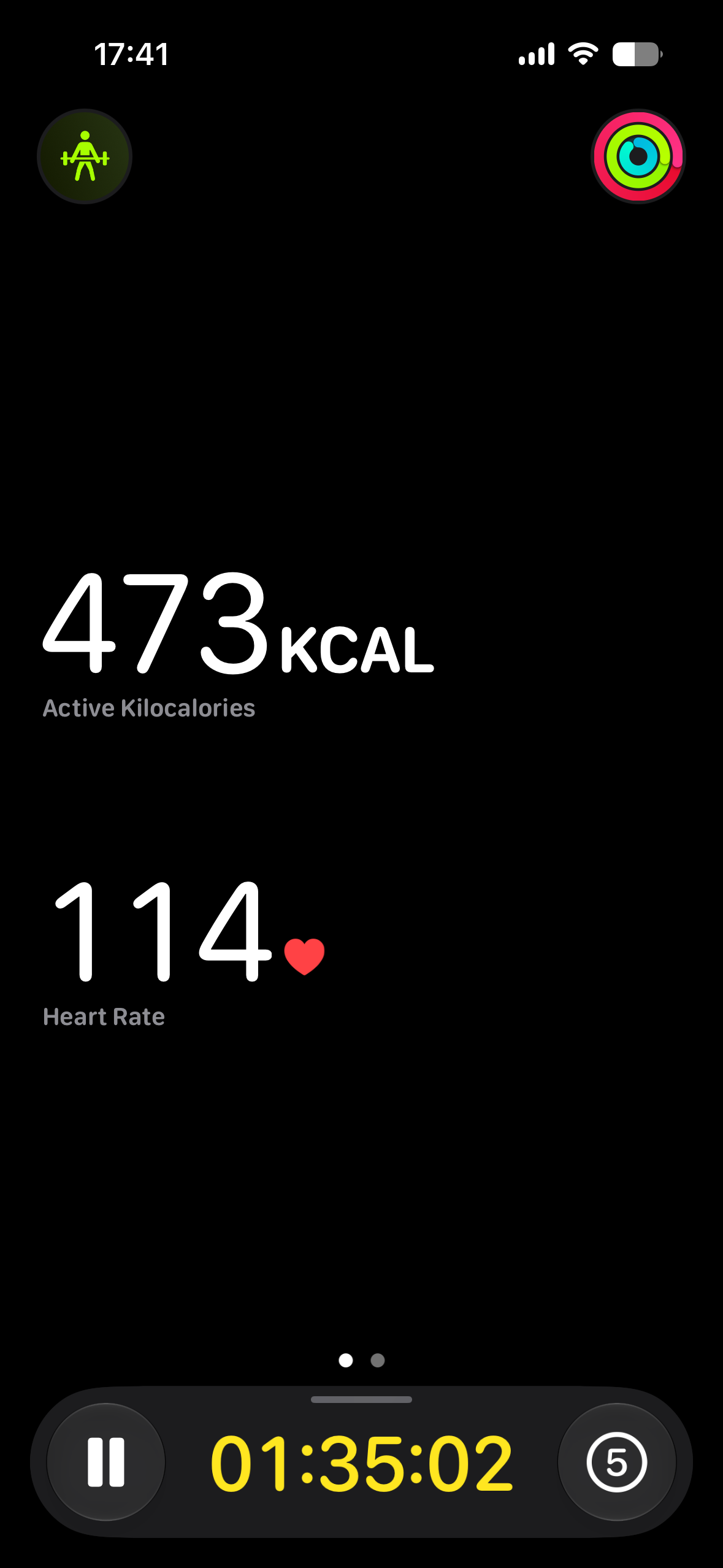
Workout view was also redesigned a bit, data is now centered instead of being at the top.

techspinning
Contributor


gigapocket1
macrumors 68030
Nice touch for sureThe paste option in messages is a nice quality of life thing!
adrianlondon
macrumors 604
I've not worked out what that does.iCloud Photos has a new option to Sync to iCloud Immediately with the only option is For Today or Off
Photos I take are sync'd very quickly to my Macbook (also on the beta), and edits I make there get sync'd back very quickly. As do any deletes.
So I'm not sure what extra can by synchronised or how much faster.
techspinning
Contributor

TheCart
macrumors regular
It's probably there for when you're on mobile data or don't have high battery percentage, which can delay syncing.I've not worked out what that does.
Photos I take are sync'd very quickly to my Macbook (also on the beta), and edits I make there get sync'd back very quickly. As do any deletes.
So I'm not sure what extra can by synchronised or how much faster.
I recently had a day where I took a loooot of pictures and some long videos and none of them were synced because I was on mobile data, even though I have unlimited data and I have it toggled on in settings. Seems like it's more of a battery than data thing.
adrianlondon
macrumors 604
More shortcut stuff:
I have a few which send commands to my Philips Hue hub, for turning lights on/off, setting scenes etc. and they all have the URL in them that's needed to send the commands.
I created a global "storage" variable, and refer to that in every shortcut now. So if I ever change my Hue hub's IP address I can simply edit the variable.
I have a few which send commands to my Philips Hue hub, for turning lights on/off, setting scenes etc. and they all have the URL in them that's needed to send the commands.
I created a global "storage" variable, and refer to that in every shortcut now. So if I ever change my Hue hub's IP address I can simply edit the variable.

NBKindaGirl
macrumors 6502a
Finally got new Siri and the new notification animation is great!
WiFi protocol is now displayed in the details pane of Settings.

Arran
macrumors 603
In Apple Home, you can now seamlessly scroll through a single timeline of security camera events that involve multiple cameras. Each event even has its own little thumbnail to help find the right one.
No more manually jumping back and forth between individual camera timelines trying to find the same spot on each.
Very slick. Very impressed.
No more manually jumping back and forth between individual camera timelines trying to find the same spot on each.
Very slick. Very impressed.
Kinda. Swipe up on photo and on the bottom left it has a small circle of the person, if they're not identified it has a small blue question mark and you can add the personCan someone confirm if you can manually identify/tag a person in the Photos app instead of relying on the app to do it itself?
adrianlondon
macrumors 604
For a long time (years?) I've been using Siri to facetime someone.
"FaceTime John" and Siri would respond "FaceTime John Smith, mobile" as it was using the number I'd stored in Contacts under the field "mobile".
Since iOS 27, Siri is now replying with "FaceTime John Smith". It's just one word removed, but it sounds much cleaner.
"FaceTime John" and Siri would respond "FaceTime John Smith, mobile" as it was using the number I'd stored in Contacts under the field "mobile".
Since iOS 27, Siri is now replying with "FaceTime John Smith". It's just one word removed, but it sounds much cleaner.
bchery21
macrumors 6502a
Thank you, unfortunately that's how it currently is I believe. I was hoping we could now manually identify a person in the photo if the small circle was not there, after swiping up on the photo.Kinda. Swipe up on photo and on the bottom left it has a small circle of the person, if they're not identified it has a small blue question mark and you can add the person

Diopter
macrumors regular
Finally they are giving the Home app some attention. The camera timeline UI was always so frustrating and buggy to use! Trying to scroll through to find something has always been so difficult, and zooming into a video and rotating the device has been so glitchy (sometimes with a thumbnail getting stuck over the top of the video!).In Apple Home, you can now seamlessly scroll through a single timeline of security camera events that involve multiple cameras. Each event even has its own little thumbnail to help find the right one.
No more manually jumping back and forth between individual camera timelines trying to find the same spot on each.
Very slick. Very impressed.
(I assume all of this work has been done due to the rumored upcoming “home hub” device)
Arran
macrumors 603
Pinch in/out zooming. Ugh! Don't get me started on that 🙂Finally they are giving the Home app some attention. The camera timeline UI was always so frustrating and buggy to use! Trying to scroll through to find something has always been so difficult, and zooming into a video and rotating the device has been so glitchy (sometimes with a thumbnail getting stuck over the top of the video!).
(I assume all of this work has been done due to the rumored upcoming “home hub” device)
Diopter
macrumors regular
Oh yes... it has been so annoying over the years!Pinch in/out zooming. Ugh! Don't get me started on that 🙂
In every iOS release I was hoping they'd fix some of the bugs with it, but every year literally nothing changed. In hindsight, they must have known that there was a plan to totally rewrite it, so no one was going to spend any time fixing the issues in the meantime.

dannyyankou
macrumors P6
It’s so awkward reaching up to the top of the display for Siri. I kinda wish they would move it to the bottom. Maybe the bottom right for Siri and the bottom middle for multitasking, or the other way around. Or they could’ve kept double tap to type to Siri.
You can access it via the side button too.It’s so awkward reaching up to the top of the display for Siri. I kinda wish they would move it to the bottom. Maybe the bottom right for Siri and the bottom middle for multitasking, or the other way around. Or they could’ve kept double tap to type to Siri.