

Become a MacRumors Supporter for $50/year with no ads, ability to filter front page stories, and private forums.

MacRumors

macrumors bot
Original poster


Apple is making more of an effort to turn the iPhone into a physical wallet replacement in iOS 27, and there are several upgrades to the Wallet app.
iOS-27-Adds-These-New-Features-to-Your-iPhones-Wallet-Feature.jpg

Pass Upgrades

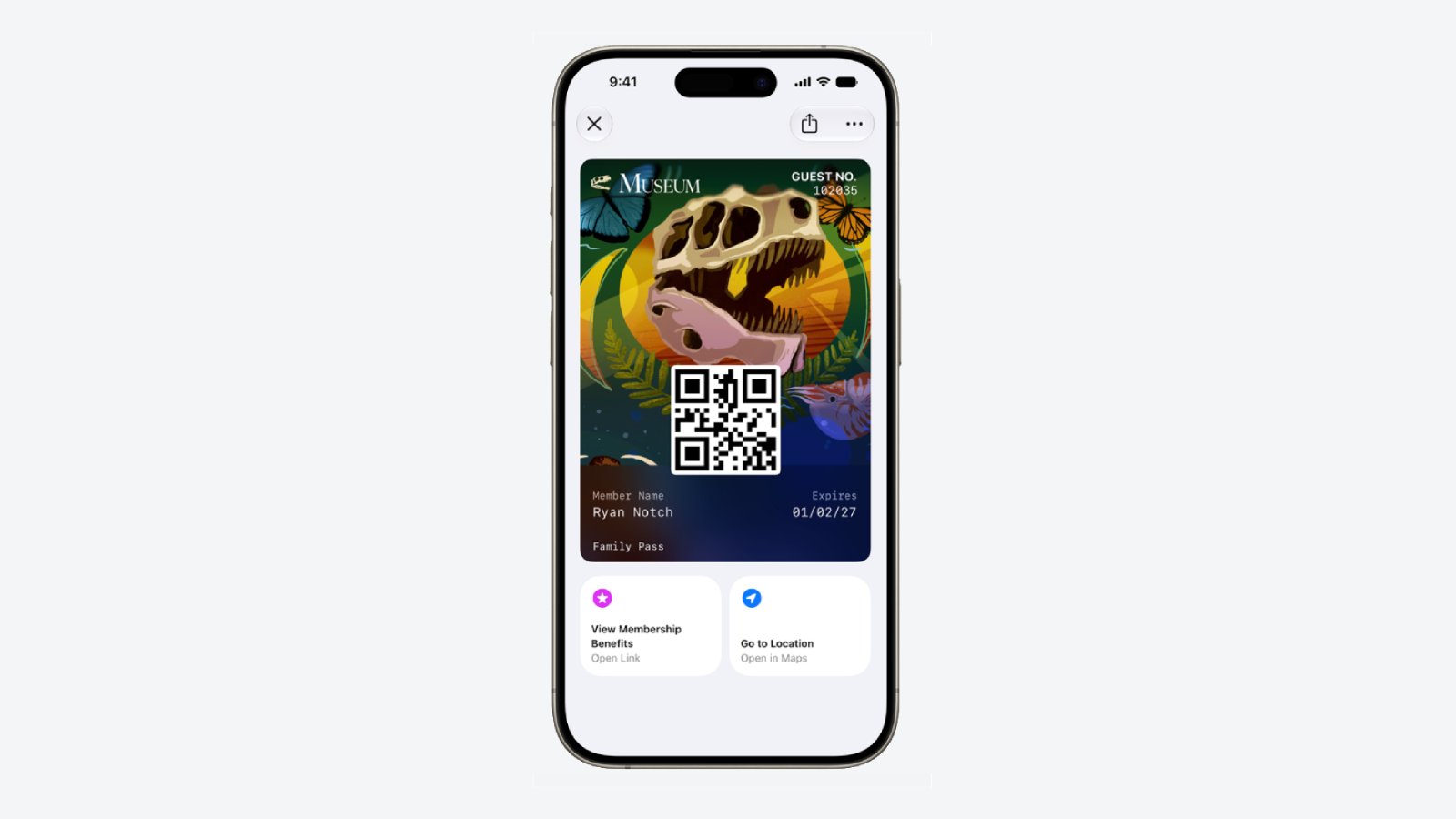
Apple upgraded airline boarding passes in the Wallet app with iOS 26, and in iOS 27, upgrades are coming to additional types of passes. Memberships, gift cards, loyalty cards, and rewards cards can use a bolder "Poster Generic" card style with full background images, primary logo, header fields, footer field, primary fields, and an optional barcode.
Apple-Wallet-Enhanced-Pass-iOS-27.jpg

Each pass is able to include up to two actions that can be tapped from the bottom of the pass, such as getting directions to a venue or checking a rewards point balance.

Apple is also allowing users to check the pass issuer certificate to ensure that a digital pass is legitimate (not applicable to Create a Pass), and there are four new barcode types supported, including EAN–13, Code 39, Codabar, and ITF.

There is a new Pass Designer Mac app for developers that makes it easier to create a pass using a WYSIWYG editor.
Create a Pass

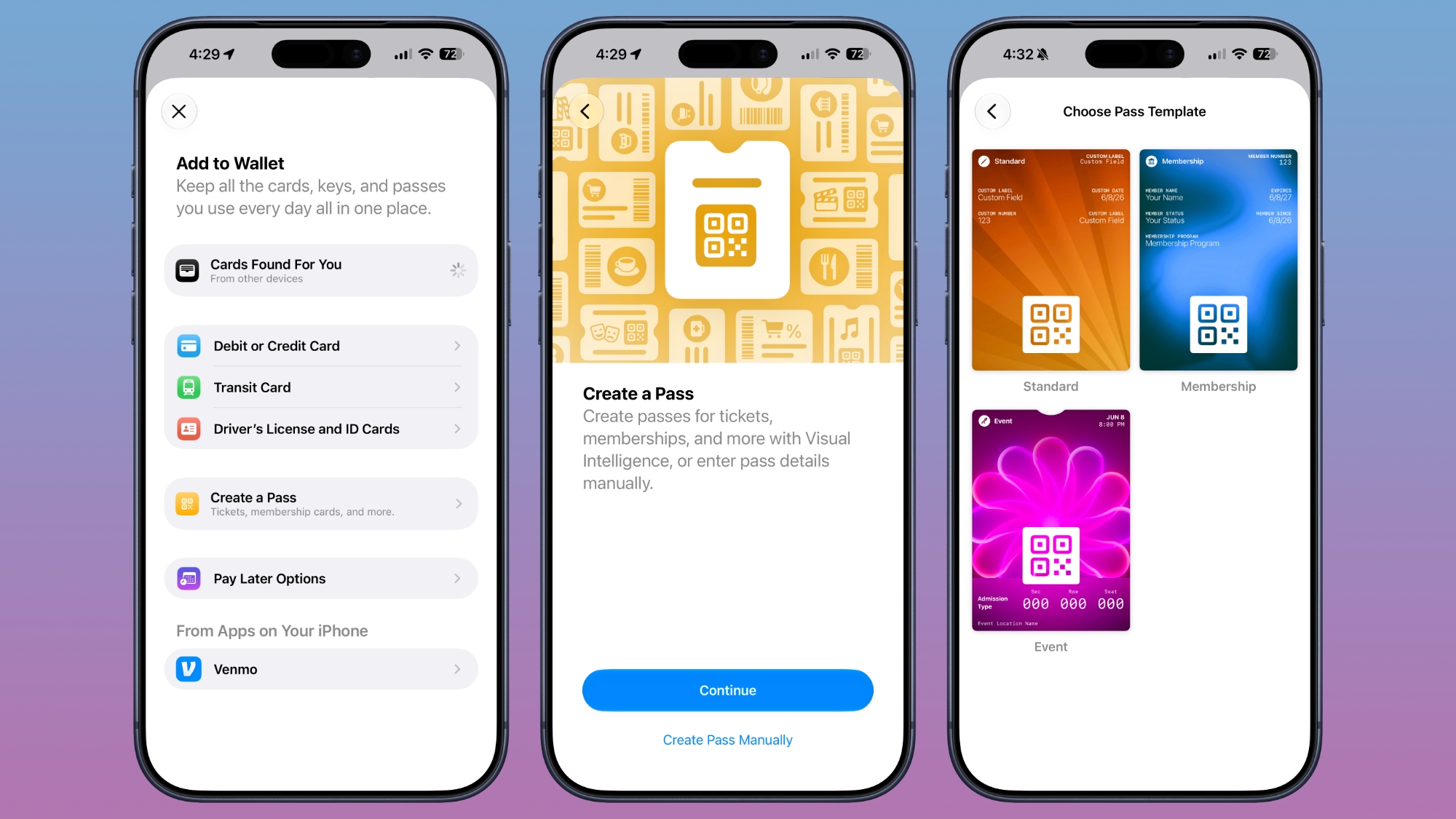
There's a "Create a Pass" feature in the Wallet app for adding tickets, memberships, and more using Visual Intelligence. If you have a ticket for an event and there's not a digital version available for the Wallet app already, you can create one using the physical pass.
ios-27-wallet-create-pass.jpg


You can scan a pass and add it with Visual Intelligence if there's a barcode or QR code, or a pass can be added manually. Pass templates include Standard, Membership, and Event.

Each type includes relevant information like name, location, or admission type, along with a scannable code drawn from an included barcode or QR code that you take a photo of. There are 12 background colors to choose from with different texture options, or seven custom backgrounds for categories like theater, music, sports, and movies.

Fields can be added or removed as needed when creating a custom pass, with options like label, date, membership, contact, coupon code, VIN, insurance, and more, so most physical cards are able to be stored digitally.
Hotel Keys

When you add a digital hotel key from a participating hotel to the Wallet app, you can now view more details about the trip. Hotels can provide updates on booked activities and allow access to different services.
AI Bill Splitting

Using the new Siri Mode in the Camera app, or a feature in the Messages and Wallet apps, you can take a photo of a bill and use Apple Intelligence to figure out what each person owes. Visual Intelligence scans the receipt and makes a digital copy of everything on the list, and each person can select what they consumed. Tax and tip portions are also calculated automatically.

Payments can be made using Apple Cash, which is a U.S.-only feature.
Insights

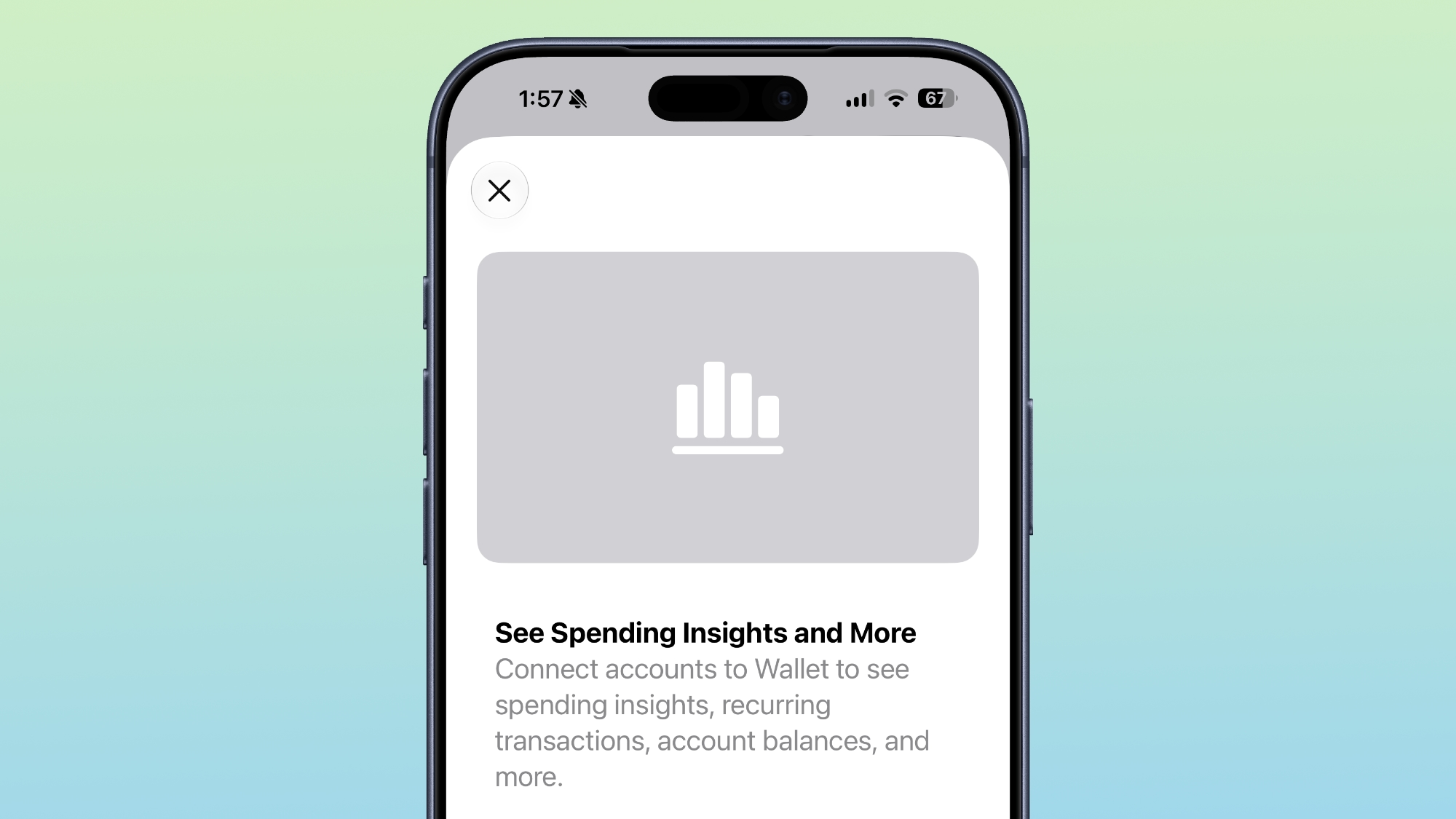
iOS 27 includes an "Insights" feature where you can add financial accounts to the Wallet app to monitor spending.
wallet-app-insights.jpg


Insights is an expansion of the Connected Accounts feature in earlier versions of iOS, and it includes spending, recurring transactions, account balances, and more. It works for financial institutions that have implemented Connected Cards support, including several UK banks.
Order Tracking

Order tracking in the Wallet app is expanding to Australia and Canada in iOS 27. In iOS 26, it was limited to the United States and UK.
Tap to Share

Tap to Share is an iOS 27 feature that lets customers connect to a participating merchant's iPhone for quicker digital checkout.
Device Requirements

Visual Intelligence is an Apple Intelligence feature requiring an iPhone 15 Pro or newer. Many of the other features should work on all iPhones.

Article Link: iOS 27 Wallet App Gets 7 New Features
 
  • Haha
Reactions: Z-4195
On the complete opposite, I'm eagerly waiting for the day I don't have to carry a physical wallet in my pockets anymore.
Which is fine, but my physical wallet isn't trying to show me my finances etc either. If they want the Wallet app to behave like a physical wallet, it should do one thing good and that is, allow me to store cards in it. Leave it to other apps for those financial insights etc.
 
Which is fine, but my physical wallet isn't trying to show me my finances etc
I'm not totally against it showing finances, but the problem is, such feature never really works. It would work if we have all the individual articles one buys, but it would be not only impossible to have, but would also go totally against user privacy. I think it would work in very specific countries such as Brazil, because the government has a database of pretty much every single thing you buy with your "CPF" (= social security number).

When I go to Costco, things get reported in my banking app as "personal expenses", as if I go there to have fun.
I would say ⅓ of my Costco bills is for food, ⅓ is for home-related stuff, ⅓ is for pharmacy stuff (pills, supplements, etc.).
 
  • Like
Reactions: 01cowherd
I'm not totally against it showing finances, but the problem is, such feature never really works. It would work if we have all the individual articles one buys, but it would be not only impossible to have, but would also go totally against user privacy. I think it would work in very specific countries such as Brazil, because the government has a database of pretty much every single thing you buy with your "CPF" (= social security number).

When I go to Costco, things get reported in my banking app as "personal expenses", as if I go there to have fun.
I would say ⅓ of my Costco bills is for food, ⅓ is for home-related stuff, ⅓ is for pharmacy stuff (pills, supplements, etc.).
You’re credit cards are already selling all the info about what you buy, that’s why when you buy something or shop somewhere you start seeing ads about it
 
Just returned from long 5 days attending the U12 regional tourney in Salt Lake City. Players, plus parents/families, saw dinner parties at around 50 people, where team sat together and parents/families sat together. Made for some tricky “check please” moments at the end of dinner. The ticket-splitting assistance sounds like it could have been handy for that nightmare. Interested to check that out.
 
Only issue I have with pass creation is it’s still super limited compared to Pass2U app, on pass2u you can do all the same and it adds to wallet but it lets you create trigger locations, like if I make a gym pass with QR code I set the location of gym and send to apple wallet from pass2u , I not get a apple wallet pass show up when I’m near the gym
 
  • Like
Reactions: insomniac86
You’re credit cards are already selling all the info about what you buy, that’s why when you buy something or shop somewhere you start seeing ads about it
Your credit cards have no clue about what you're buying. I don't know where you got that from.

They know the amount and who you're sending it to, not every single item on the list
 
  • Like
Reactions: CarlJ
Can Apple please add the ability to nickname different cards. I have 4 accounts from the same back and they all have the same colour card and it’s impossible to tell which account is for which card.

I’ve been requesting this since Apple Pay was available in Australia. I can’t be the only one who can’t tell what card is for which account out there.

Mac Rumours. Can you not do a post on this to raise attention. This would be one of the most basic software updates for Apple to implement.
 
Insights in Wallet isn't actually working

Get the splash screen.. click continue... and just takes you to the Add to Wallet screen
 
Can Apple please add the ability to nickname different cards. I have 4 accounts from the same back and they all have the same colour card and it’s impossible to tell which account is for which card.

I’ve been requesting this since Apple Pay was available in Australia. I can’t be the only one who can’t tell what card is for which account out there.

Mac Rumours. Can you not do a post on this to raise attention. This would be one of the most basic software updates for Apple to implement.
I think you can:
Settings; Wallet & Apple Pay; AutoFill Cards. Then select the card you want and edit the description.
Enjoy!
 
Apple is also allowing users to check the pass issuer certificate to ensure that a digital pass is legitimate (not applicable to Create a Pass), and there are four new barcode types supported, including EAN–13, Code 39, Codabar, and ITF.
I'm pleased to see they're adding additional barcode types (including Codabar, which is used by many library systems, apparently), but they really need to add a system to support QR/bar codes that update based on time - lots of places, like Target and Costco, and some transit systems, use codes that update every minute or so, so that you can't just share a screenshot to other people. Which is fine, I guess, except it means you have to open that app every time,minstead of using Wallet.

So, add an API that app developers for the various store apps can use to register a callback - so you can have the pass in Apple Wallet, and when you bring up that card, Wallet asks the app "what's the right code for right now?". It preserves their security (no one can screenshot your card to use), but makes it just as frictionless as other cards in Wallet (just idly checked, and to get to my Target barcode in the Target app took 9 actions plus a bit of waiting, from a locked iPhone, while getting to my IKEA card in Apple Wallet took 3).
 
I find the order tracking to be a pretty useless feature, and at times annoying.
More often than not, for me, it's triggering on emailed receipts in-store. Like I check out - in-person - at the pet store, and they ask how I want my receipt and I say email please, they say, "sure", and I walk out the door (they have my email on file).

A moment later, I get email from the store with the receipt, and... Apple Wallet leaps into action, saying "the pet store has received your order!". Dude, I'm walking to the car with a bag full of cat food, there was never an "order", and the transaction is complete - you've totally missed the boat. 🙄
 
Over here, in Germany, bill splitting isn’t something people need to do. Either somebody picks up the tab for the table and next time, someone else pays, or the waitress will come around with the bill and go to each person in turn, cross off what they had and calculate the bill for that person and let them pay separately. They just jot down the cost of each item on their block and tally up the total for that person, or, in some restaurants, the servers smartphone or tablet will let them mark certain items and tally up just that, then remove it from the remaining total, but most, they just sum up on paper what each person has eaten or drunk.
 
Would be nice if the wallet knew which card offered the best rewards for when I’m going to pay
Yeah I get your idea about "rewards" for paying on Apple Pay etc for example earn points or $$ towards to pay apple stuff or Netflix or something like that
 
Register on MacRumors! This sidebar will go away, and you'll see fewer ads.