Become a MacRumors Supporter for $50/year with no ads, ability to filter front page stories, and private forums.

Idolum

macrumors member
Original poster
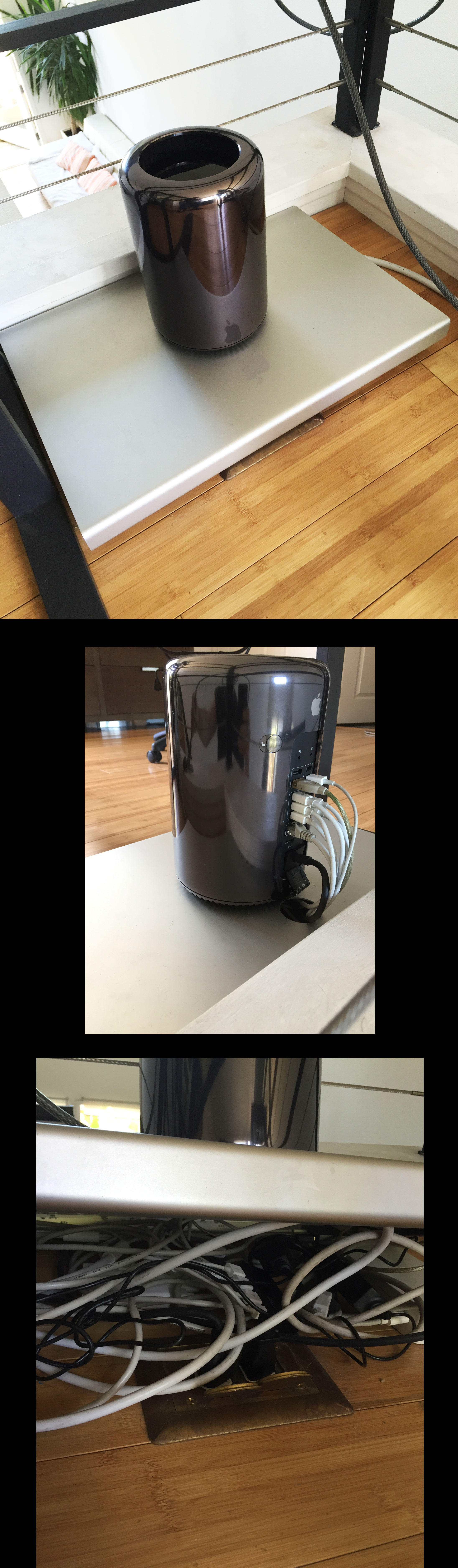
I stumbled upon a fine solution to hide all the unsightly cables attached to my cylinder Mac Pro. I was gifted an old 23 inch cinema display which I took apart for fun. It turns out that the hollow aluminium case makes the perfect platform for the Mac Pro. An old 20 inch cinema display will do just fine if you don’t have too many monitor power bricks that need to be hidden.

IMG_5067.JPG
 
Good* solution but i'm shocked you don't have a surge protector in place. I'd have an isobar there minimum.
 
Last edited:
Good point - I actually didn't think about it until you brought it up. I always had everything connected to a power strip before. I'll get a small one with surge protector.
 
I stumbled upon a fine solution to hide all the unsightly cables attached to my cylinder Mac Pro. I was gifted an old 23 inch cinema display which I took apart for fun. It turns out that the hollow aluminium case makes the perfect platform for the Mac Pro. An old 20 inch cinema display will do just fine if you don’t have too many monitor power bricks that need to be hidden.
That's pretty slick. Thanks for sharing!
 
got to say thats one cool looking setup ^^
the nmp still makes me think of the g4 cube >.< why cant we have a new version of that computer
 
Was the screen broken or did you take it apart just to break things?!
I initially planned to replace the background LED lights. That, however, is not that easy to do since the light bulbs are buried underneath the entire screen assembly. One of the logic boards is also glued to the screen which came loose.

Professionals will charge $300 to replace the 30 inch screen LEDs so I also wanted to find out if that is something I can do by myself. It's definitely challenging.

A 20 inch cinema display with a broken screen can be purchased for as low as $15 on craigslist. It will take 10 minutes to take apart. Just follow the "Most Helpful Answer" in this IFIXIT thread:

https://www.ifixit.com/Answers/View/16517/How+to+disassemble+a+23"+Apple+Cinema+Display+(A1082)

Be careful with the two plastic sides which are glued to the cinema display. They have to be put back into place once everything else is removed.
 
Last edited:
  • Like
Reactions: h9826790
Register on MacRumors! This sidebar will go away, and you'll see fewer ads.