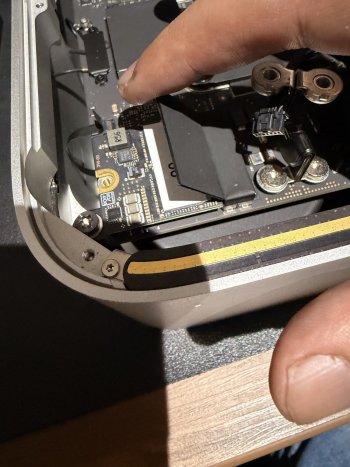
I was thinking the same but hoping I was doing something wrong. I really need to get this storage going for my projects.Sounds like faulty drives then.


I was thinking the same but hoping I was doing something wrong. I really need to get this storage going for my projects.Sounds like faulty drives then.

Hey everyone, hate this is my first post here but I'm getting to wits end with Polysoft and hoping to get some help or maybe a response from Gilles here. I purchased the 8TB kit for my M2 Max Studio back in June of 25. Everyone knows the story of delays etc. I reached out a couple times and got some feedback about it being delayed and asked if I was willing to wait.
Long story short I waited, received my kit on 12/23/25 and proceeded to install. I am not sure if there is a difference in the M1,M2,M3,M4 kits but what I received had an instruction booklet for the M4. Assuming this was just updated literature I proceeded with the install and received this error. "The Mac "Mac" could not be restored. An unknown error occurred. (35). 064E.0023". I installed the drives as labeled with 00 on the left and 01 on the right. I restored my studio with the original drive successfully, reinstalled the drives in the opposite orientation assuming they were labeled incorrectly and received the same error. I tried this back and forth multiple times and the only success I've had was getting more proficient at completing it and successfully restoring with the original drive.
I reached out to Gilles and sent the photo of the error and waited a few days due to the holiday. I have reached out multiple times and I have not gotten a response on this yet. Maybe someone here can assist with me possibly completing the install incorrectly. Any insight is appreciated.
Thanks for the input. Just one question, does your new SSD make a bit more noise than the original one? In my case, when I had the 1TB, I couldn’t hear anything, but with the new ones (4+4=8), I do notice some sound when the drive is working.I've been following this thread closely and happened to receive both Polysoft (temporarily) and FANGYUAN so thought I'd chime in with my experience.
TL;DR
Ordered a 8 TB M4 Max back in June but gave up after the 21st November miss. I requested a refund also started the chargeback. Ordered from FANGYUAN instead. The Poylsoft order randomly arrived the day after my Aliexpress one. Tuned out it was the wrong size but Gilles responded with return label and refund within 3 days. The 8TB FANGYUAN SSD is running smoothly.
Polysoft SSD
I ordered a 8 TB for M4 Max using Luke Miani's discount code back in June with the expected 2 month wait. Held on as the production issues occurred and delays mounted because of the discount. Final straw was the November 21st date. Black Friday meant I could get the SSD from FANGYUAN for close to the same price so I messaged Polysoft days before asking for a refund if the package didn't arrive by the 21st and indicating I will make a chargeback otherwise.
Or course, the day came and went with no response, so I initiated a chargeback a week later. Gilles did eventually get back to me on the 2nd of December confirming if I wanted a refund so I said yes and waited. I finally received my Polysoft order on the 12th just after my Aliexpress FANGYUAN on the 11th. Turned out there was only 1 module in to so messaged again asking for a prepaid return label and refund. Surprisingly got a response today with the refund and return label.
Interestingly my Polysoft SSD came with a Wera diver with T6, T8, and T10 bits, so it seems the Minnow is not universal.
View attachment 2588638
Aliexpress FANGYUAN SSD
The box brand was Lynxis, which looks like the brand other Ali stores sell. They come in a nice box but not in any anti-static bags like Polysoft. Tools are also included along with a thin metal pry tool and 'guitar pick.' Unfortunately the pick was too thick so I had to carefully use the metal tool to remove the black ring. No scratches if you're careful. The NAND themselves are labeled Hynix but don't have black underfill like @Den-Fi.
View attachment 2588639
Installation was smooth but I used Polysoft's instructions as the Lynxis one wasn't as detailed. The bottom cover screws were indeed very tight so I ultimately used my own tools. Restore was also simple. Just connected the DFU MacStudio to another Mac and used the Finder to do the restore. Didn't need Apple Configurator 2.
Performance was on par with what everyone else is getting. Amorphous disk mark summarised below. I bought the 512GB MacStudio so it's speeds are after the /
4GB Read (MB/s) 4GB Write (MB/s) 64GB Read (MB/s) 64GB Write (MB/s) SEQ1M QD8 7368/6662 8462/4143 6966 7003 SEQ1M QD1 4222/3382 7489/4143 1987 3971 RND4K QD64 1012/1241 261/156 584 252 RND4K QD1 54/62 39/39 32 27
I had been booting from an external SSD while waiting so ran f3write on the new one as full disk write test. Couldn't find a data logger for Mac like HWiNFO so used iostat instead with this command.
Code:iostat -w 1 disk0 2>&1 | tee Output.txt
This resulted in a log of the write speed in 1 second intervals.
View attachment 2588637
I was quite surprised there were no significant drops in speed as I would expect once the SLC cache runs out. I don't know enough about how f3write writes to disk and this is by no means a rigorous test, so take the results with a grain of salt. f3read showed no corrupt sectors so all good there.
Conclusions
I originally went with Polysoft since they had a successful Kickstarter and offered a 5 year warranty, although as time went on I lost confidence in the ability for them to honour it. I still believe that there was no malicious intent on Polysoft's part, just that they got overwhelmed and had abysmal communication and expectation management. As a Stockholm Apple user, I think things that Gilles and dosdude do is very important. It's promising to see Gilles responding more quickly, at least to me. Ultimately I'm just relieved that I've finally got an SSD installed.
Finally, @gilles_polysoft. I hope that some takeaway from this is that communication is extremely important. No doubt you can see that is a common theme in many of the posts here. I don't need a personalised email, just regular generic updates. While I can't speak for everyone, I understand you're a small business and delays happen for such a niche product. I would be more willing to wait if I had updated information. I hope that others get their orders more quickly from now on and for those thinking about ordering, at this stage, caveat emptor.
How does an SSD make noise?Thanks for the input. Just one question, does your new SSD make a bit more noise than the original one? In my case, when I had the 1TB, I couldn’t hear anything, but with the new ones (4+4=8), I do notice some sound when the drive is working.
How does an SSD make noise?

Can’t hear anything on your video, but then my ears aren’t what they used to be.It makes noise with any action the ssd performs, even when I just navigate through menu options. If it loads a list, the sound changes too. Similar to a squeaking sound, or like a little bird chirping.
I reinstall the original SSD and there's no noise, or at least not as noticeable.
View attachment 2592822

The noise you are hearing is called coil whine, and some, not all electronics exhibit it this. Personally, if it were me, I'd look to return the components as defective if at all possible. There's really not anything you can do other then move your mac in a location that diminishes the sound for you, i.e., under a desk or something.It makes noise with any action the ssd performs, even when I just navigate through menu options. If it loads a list, the sound changes too. Similar to a squeaking sound, or like a little bird chirping.
I had to turn the sound all the way up and I heard itCan’t hear anything on your video, but then my ears aren’t what they used to be.

Yes, lots in my mbp late 13, I almost took them to court. I was thinking of what happens after the warranty goes out.
 .
.
I doubt the components are defective. They‘re just stressing the power electronics in the Mac more due to higher power draw.The noise you are hearing is called coil whine, and some, not all electronics exhibit it this. Personally, if it were me, I'd look to return the components as defective if at all possible.
I’m no technician by trade, but I’d not feel confident to try and hide the symptoms instead of tackling the root cause.There's really not anything you can do other then move your mac in a location that diminishes the sound for you, i.e., under a desk or something.
Tried it again at full volume, but it was difficult to tell whether there was static or coil whine. In any case the coil whine I remember on my old s30i was way more pronounced and easy to recognize.I had to turn the sound all the way up and I heard it
They’re a company, not the Salvation Army. Welcome to capitalism! :-/They want people to buy a new system when the warranty goes out

Elecontric circuity of the SSD definitely can generate a coil whine like noise. Given that he placed the new nand modules in and the sound appears points to that very thing happening.If the noise is indeed coil whine, then it originates from the Mac Studio PSU copper coils, not on the SSD boards.
I switched back to the original 1TB SSD, and the noise is no longer audible, only if I press my ear against the Mac Studio do I hear a very faint sound, at a much lower scale, like 10 times quieter.If the noise is indeed coil whine, then it originates from the Mac Studio PSU copper coils, not on the SSD boards. It is very unlikely to be something faulty on those SSD boards that induce the whine on the Apple original PSU, especially considering we have had reports of people hearing coil whine on their unmodified Studios since the very beginning.
What is happening, if I were to take a wild guess, is that adding the extra card may have been drawing more power than before, insofar the PSU goes from producing less than audible whine to now audible to the poster above. And / or, the whine has always been there, it's just after the SSD surgery the poster only now starts paying attention and attribute the cause to the SSD cards.
Another guess I can think of, maybe with the SSD surgery, the air flow or the build up of dust has changed a bit inside the fan and exhaust chambers (I suppose very few of us here would bother to tear the fan chamber apart to clean, as it is unnecessary for the SSD swap). This then created new airways with fan / dust, or vibration with loose cables / screws whatever that started producing noises.
I learn something new everyday. Love these forums.The noise you are hearing is called coil whine, and some, not all electronics exhibit it this. Personally, if it were me, I'd look to return the components as defective if at all possible. There's really not anything you can do other then move your mac in a location that diminishes the sound for you, i.e., under a desk or something.
I had to turn the sound all the way up and I heard it
Just out of statistic curiosity: Are you a younger folk or a matured fellow? Because when the hearing capabilities inevitably deteriorate with age, the high frequencies are the first to go (even if not noticeable yet in daily life), thus impairing the ability to perceive coil whine.I upgraded from a stock 512GB to a 8TB Polysoft SSD on a M4 Max and didn't hear any increase in operating noise or 'whine' when running a stress test.