Become a MacRumors Supporter for $50/year with no ads, ability to filter front page stories, and private forums.

DouglasCarroll

macrumors 6502a
Original poster
(RANT START)

Soooooo, why the hell is it so difficult for programmers to put system requirements with their software? I've been pouring over some programs lately looking for either updates to programs I currently use, or older versions that run on some of my many Macs, and I've noticed a disturbing trend....programmers think it's really "funny" to have a thousand updates to a program, but can't be bothered to actually post any system or OS requirements for the 500 different versions of their programs that are archived on their "github" or whatever site. Hell, they OFTEN don't even bother to post system requirement for the CURRENT version of their software, just the mysterious "MAC" heading. It's SUPER frustrating to have to download a hundred versions of a program totally blindly hoping to find the latest, or even any, version of a program that works with the Mac OS you happen to be running. So as a public service announcement, to anyone out there who likes to program, thank you that's awesome and I appreciate your effort, but I BEG you could you PLEASE at least in the read me for Gods sake, post the damn OS requirements for your programs? The World will be a better and happier place if you do!

(RANT OVER)

🙂
 
Typically I end up CMD-F searching for 10., "Mojave"/Lion/etc in the github release pages or changelogs to try and find when they either added or dropped support, then start backtracking/forwardtracking to find the last version that supports the OS I need.
 
  • Like
Reactions: Amethyst1
...I will say that, especially for non-commercial projects, the developers may legitimately not know. I have this problem in reverse when I create stuff for legacy OS X, because I don't want to test modern macOS I'm actually not sure whether something works or not. I have to rely on user reports, and sometimes they conflict and I don't want to go and investigate.
 
Last edited:
If it's on github you should be able to get the sdk version it was built with quite easily (this doesn't always guarantee compatibility, but usually just a few things to be polyfilled).
 
I remember having to find a photo of the box for an older game to find the system requirements because they didn't bother to list them in either the manual or the readme file! I agree that it can be really annoying when there's no detail. A friend of mine once downloaded something documented simply as "for Windows" on an older computer and it failed to launch. Turned out it was compiled for 64-bit and wouldn't run on his 32-bit machine, but did they bother mentioning that? Of course not.
 
Of particular annoyance are the programs that install an update/upgrade without even bothering to perform a system check and then confusion ensues for the user when the software no longer runs.

This is exactly what happened to me with the Session messenger software recently and I eventually deduced that the updated version isn't compatible with my OS. I was able to rollback to the previous version with a basic re-install and all my configurations were preserved but how hard would it have been to include a system requirements check and fail to install if they're not met and to alert the user?
 
Of particular annoyance are the programs that install an update/upgrade without even bothering to perform a system check and then confusion ensues for the user when the software no longer runs.

This is exactly what happened to me with the Session messenger software recently and I eventually deduced that the updated version isn't compatible with my OS. I was able to rollback to the previous version with a basic re-install and all my configurations were preserved but how hard would it have been to include a system requirements check and fail to install if they're not met and to alert the user?
Errgh... hate that so much. Especially when it decides to auto update to a bad version before you even get a chance to set up the software and turn off auto updates (Stats...)
 
  • Like
Reactions: MacFoxG4
Errgh... hate that so much. Especially when it decides to auto update to a bad version before you even get a chance to set up the software and turn off auto updates (Stats...)

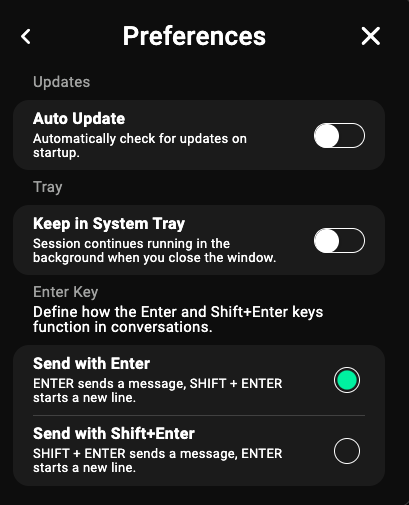
Quite right but I've now seen to it that this can never happen again. 🙂

oMrQlJ2.png


Configuring the firewall to warn you when attempts are made to phone home for updates is a helpful precautionary measure.
 
Of particular annoyance are the programs that install an update/upgrade without even bothering to perform a system check and then confusion ensues for the user when the software no longer runs.

This is exactly what happened to me with the Session messenger software recently and I eventually deduced that the updated version isn't compatible with my OS. I was able to rollback to the previous version with a basic re-install and all my configurations were preserved but how hard would it have been to include a system requirements check and fail to install if they're not met and to alert the user?
Yes, this!

What's even better is when the software "entices you" with the "A newer version of the software is available, want to update!" in a cheerful dialog.

Trickery, trickery, trickery....

What the dialog SHOULD say is this...

"Hey, how would you like to have your working application "updated" to a non compatible version AND at the same time, I'll go ahead and ERASE your currently compatible version off of your computer for you, BUT WAIT I'M NOT DONE YET, I'll also make certain that the author of the software has DELETED the older version that worked from his website and now ONLY the incompatible version is available for you to attempt to re-download!!! Ha ha ha ha ha!!! SUCKER"

(the above text would be over layed on top of a graphic of a middle finger)


...yes, this exact scenario has happened to me MORE than one time in the past...

😦
 
Last edited:
You can, of course, restore the earlier version from your computer backups, right? ...Right?
Yes, the old “blame the user for the lack of programmers diligence” fall back…

🤨

“Booby trapping” the user is not okay simply because someone has a backup…
 
Last edited:
  • Like
Reactions: MacFoxG4
...yes, this exact scenario has happened to me MORE than one time in the past...

Me too - and its led to many a search across the Web to find an alternative download location. Failing that, The Wayback Machine often conjures up results.

You can, of course, restore the earlier version from your computer backups, right? ...Right?

This, is a lesson that I've learned the hard way. Never, ever delete the older versions of installers!
 
Yes, the old “blame the user for the lack of programmers diligence” fall back…
I am by no means "blaming" you for anything. However, if you do not currently at this moment have Time Machine set up†, I encourage you to literally drop whatever it is you're doing and get that sorted ASAP, because at some point your hard disk is going to die or some software will royally screw up or you will royally screw up and if you have a backup it basically doesn't matter, and if you don't there's no going back.

† An equivalent continuous backup solution is fine too.

P.S. Even better is to get two Time Machine drives and rotate which one is connected at any given time. Now you have cold storage that's out of reach of any software bugs or malware.
 
Last edited:
  • Like
Reactions: Ben Sparrow
Register on MacRumors! This sidebar will go away, and you'll see fewer ads.