
Become a MacRumors Supporter for $50/year with no ads, ability to filter front page stories, and private forums.

TwoBytes

macrumors 68040
Original poster
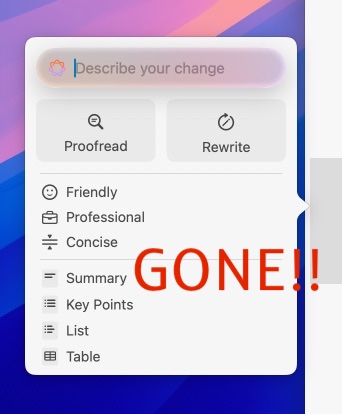
How could Apple remove them?! https://support.apple.com/en-gb/guide/mac-help/mchldcd6c260/mac

This screenshot is from Tahoe:
writing-tools1.jpeg


Yes you can now ask Siri, but manually typing 'proofread this' and clicking through secondary menus completely ruins the workflow.
 
Last edited:
  • Wow
Reactions: rb2112
That's so strange. I don't see those writing tools at all!
Maybe this is a bug😲

I read a few others on the net don't see them either but i'm guessing this will be fixed next release.
 
Interesting. My UI in Notes in Golden Gate (latest beta) is different. No need to select anything, click the same icon:

As you can see, I'm seeing exactly the same UI as in Apple's support pages for Tahoe.

Yes as you say, everything you are showing is exactly like what I see on my Tahoe Mac, including the writing tools icon which has been replaced by the Siri AI icon in Golden Gate. Apologies for suggesting this, but are you absolutely sure the screenshots you are showing really are on a Golden Gate? If you are sure then it is very, very strange.

In Settings, are you seeing "Apple Intelligence & Siri" or just "Siri"?
 
Yes as you say, everything you are showing is exactly like what I see on my Tahoe Mac, including the writing tools icon which has been replaced by the Siri AI icon in Golden Gate. Apologies for suggesting this, but are you absolutely sure the screenshots you are showing really are on a Golden Gate? If you are sure then it is very, very strange.

In Settings, are you seeing "Apple Intelligence & Siri" or just "Siri"?


It's Golden Gate and I only have Siri in System Settings:

1787478805668.png


On Tahoe, I have Apple Intelligenece & Siri.

So is Apple Intelligence now Siri AI? I've never used either Siri or writing tools and don't have any specific plans to, so in practical terms it doesn't make a difference to me.
 
It's Golden Gate and I only have Siri in System Settings:

So is Apple Intelligence now Siri AI? I've never used either Siri or writing tools and don't have any specific plans to, so in practical terms it doesn't make a difference to me.

I think your screenshot explains things. Yes Apple Intelligence is now Siri AI but it looks as though you have not opted for it. My screenshot is this:

Screenshot 2026-08-23 at 13.43.12.png


I think if you click "Try Siri AI beta" you will see the same as me, but will have the same issues about writing tools as the OP of this thread.
 
Interesting. My UI in Notes in Golden Gate (latest beta) is different. No need to select anything, click the same icon:

View attachment 2654911

As you can see, I'm seeing exactly the same UI as in Apple's support pages for Tahoe.

Yeah, those are the SAE (Apple Intelligence) 1.0 tools, which they remove once you're using Linwood/Siri AI. You can get Table, Summary, Key Points, List from the contextual Lightweight UI these days (demo from Beta 3, enabled by default now):


The Lightweight UI can also bring up more contextual actions from Maps, Contacts, Mail, etc.
 
  • Like
Reactions: Mike Boreham
I think if you click "Try Siri AI beta" you will see the same as me,

I think I now recall vaguely that I visited the settings before. I didn't want any "Siri AI" or any Siri in general, so I left it as is. I thought that Apple Intelligence was, apparently, there as Writing Tools were there. Who knows, maybe one day I'll find these options more interesting to explore.
 
Register on MacRumors! This sidebar will go away, and you'll see fewer ads.