Become a MacRumors Supporter for $50/year with no ads, ability to filter front page stories, and private forums.
Status
The first post of this thread is a WikiPost and can be edited by anyone with the appropiate permissions. Your edits will be public.
There is this post for Linux Mint. I haven't tried it, but it might be worth a shot.

Yes, this is working here, but it is about Linux Mint Cinnamon on X11 with Ubuntu Kernel 6.8 LTS.

Afaik this kernel will be supported only until April 2029. It seems to be the last kernel supporting the Nvidia driver 470. There is no support for Wayland. Later kernels seem not to be supporting even the 470 driver anymore.

This is why I was wondering about support for iMacs 2011 with Kepler cards afterwards. Will we ever be able to run newer Kernels on Wayland with full hardware acceleration?
 
Last edited:
Not sure about the Chinese seller and the quality of his particular card, but I bought three used K2100m cards which came from Dell/Alienware Laptops and it was a good experience all in all. They work very well for both office work and light gaming! Regarding your questions:

- Is the K2100M truly "plug and play" regarding the original heatsink? (No grinding/modding required?)

Yes, no physical modifications are needed. You should get some thermal pads which are a bit thicker though for the RAM chips. Works in both 27" and 21,5" 2011 machines!

- Will I get the native EFI Boot Screen (Apple logo) with the flashed VBIOS?

Yes, with Ausdauersportler's/Nick D[v]B's VBIOS you get the boot screen and menu back as well as brightness control. For the latter, Windows needs a registry entry (can be found somewhere in this thread, I think).

- I am currently facing the "No internal audio" issue on Windows 10 UEFI. Will using OCLP (OpenCore) with this card fix both the internal audio and the brightness control in Windows?

From my experience this is not related to the GPU but if you install Open Core with OCLP and EFI boot Windows 10/11 through it, internal audio works fine (with Bootcamp drivers).

- Are the official NVIDIA Quadro laptop drivers stable for this setup on Win 10?

Yes, the drivers work fine, also for gaming. My version is 426.78 WHQL.

If you get this card at a reasonable price, go for it! The 2011 iMac is a good machine for studying, especially with the i7 and 16GB of RAM. It runs well with Win10/11 as well as with Sequoia (which will still get 1,5 years of security updates).
I upgraded my 2011 27" Mac (12,2) with an SSD 1GB, 32GB RAM and now yesterday with a K2100M NVIDIA graphic card (50€ eBay). I used the Nick D[v]B's VBIOS and flashed it with the USB method and the OCLP - many many thanks to all the great ppl who spend hours to develop the tools. The machine runs perfect now with Monterey. Fotos app, Maps app, brightness control is all working.
I tried Sequoia before, but that did not work.
Important was to setup the machine from scratch with OCLP after the graphics card was installed. I tried it before with Monterey installed and inserted the graphics card, the root patches did not work, so I installed it from scratch and voila - it works.
K2100M - no mods to heatsink, x-bar. Just some thermal pads for the memory chips and compound for the GPU
Easy graphic card installation:
VBIOS Flashing: https://forums.macrumors.com/thread....1596614/page-175?post=28184981#post-28184981
USB-Mouse and USB-Keyboard
 
I upgraded my 2011 27" Mac (12,2) with an SSD 1GB, 32GB RAM and now yesterday with a K2100M NVIDIA graphic card (50€ eBay). I used the Nick D[v]B's VBIOS and flashed it with the USB method and the OCLP - many many thanks to all the great ppl who spend hours to develop the tools. The machine runs perfect now with Monterey. Fotos app, Maps app, brightness control is all working.
I tried Sequoia before, but that did not work.
Important was to setup the machine from scratch with OCLP after the graphics card was installed. I tried it before with Monterey installed and inserted the graphics card, the root patches did not work, so I installed it from scratch and voila - it works.
K2100M - no mods to heatsink, x-bar. Just some thermal pads for the memory chips and compound for the GPU
Easy graphic card installation:
VBIOS Flashing: https://forums.macrumors.com/thread....1596614/page-175?post=28184981#post-28184981
USB-Mouse and USB-Keyboard
Great, congratulations!

But Sequoia should be fine...at least it does work here on 3 2011 machines with K2100m.

If MacOS is already installed, booting up in safe mode (hold Shift) and removing + reinstalling OCLP root patches did the trick here. There should be no need to install it from scratch.
 
Great, congratulations!

But Sequoia should be fine...at least it does work here on 3 2011 machines with K2100m.

If MacOS is already installed, booting up in safe mode (hold Shift) and removing + reinstalling OCLP root patches did the trick here. There should be no need to install it from scratch.
Interesting - Thanks for letting me know.
I get the following error message when installing Sequoia and then white screens:
"
This version of MacOS is not supported on this platform!
Reason: Mac-942B59F58194171B
# LEB ISIOPI 0x11
# ГЕВІН:IS] 0
#IEBIG:CA]
#LEBIG: CD]
#IEB.G.CS11] Err (0x2) <- 8ECE08D8-A6D4-430B-A7B0-2DF318E7884A.CD
#IEB.G.CSI-21 0k (0)
"
 
Interesting - Thanks for letting me know.
I get the following error message when installing Sequoia and then white screens:
"
This version of MacOS is not supported on this platform!
Reason: Mac-942B59F58194171B
# LEB ISIOPI 0x11
# ГЕВІН:IS] 0
#IEBIG:CA]
#LEBIG: CD]
#IEB.G.CS11] Err (0x2) <- 8ECE08D8-A6D4-430B-A7B0-2DF318E7884A.CD
#IEB.G.CSI-21 0k (0)
"
Hm, I never had this error. How did you create the USB installer? If you used a different machine, could it be possible that you did not select the correct host model (12,2)?
 
Hi, I have a 27" iMac from 2011, I currently have a 512Mb VRAM gpu card... I want to know what is the best gpu, I done some research and maybe the RX 5500XT MXM is the best option?. I also want to patch some recent MacOs like sequoia, is that possible in the RX5500XT?
 
Hi, I have a 27" iMac from 2011, I currently have a 512Mb VRAM gpu card... I want to know what is the best gpu, I done some research and maybe the RX 5500XT MXM is the best option?. I also want to patch some recent MacOs like sequoia, is that possible in the RX5500XT?
IMHO there is no such thing as "the best GPU" for your Mac. Your options vary as regards availability, price, effort, power draw, use case etc. You need to work through the first wiki-post in this thread and carefully consider the limitations, particularities etc. of each card.
 
If Monterey is already installed with OCLP 2.4.1 you could also download the Sequoia installer with the app and afterwards launch it from the applications folder.
Thanks again! So you suggest to install Sequoia directly out of the app and not with an USB Stick? I do not want to erase my data again and copy it back from external disks, as the USB 2.0 is really slow....
 
Thanks again! So you suggest to install Sequoia directly out of the app and not with an USB Stick? I do not want to erase my data again and copy it back from external disks, as the USB 2.0 is really slow....
Yes, you can download the installer in the OCLP app by clicking "Create macOS installer", then downloading the latest version of Sequoia. After the installer image has been downloaded you can abort the process and move to the Applications folder. The installer should be there and can be launched by double-clicking. While the installation proceeds, OCLP should automatically prepare the system for the update in the background. After the final reboot, OCLP automatically pops up and the root patches can be installed again.

From my experience, starting the installation from an existing macOS instance is a bit less risky and also faster, because there is no USB 2.0 involved and less restarts are needed. If everything works as it should, all data is retained. Needless to say, you should still have a backup of all important files on the system...
 
  • Like
Reactions: jr4711
Hi everyone,

I have an iMac 2011 27" (iMac12,2) with an AMD FirePro S7100X MXM card installed. The card was flashed with S7100X-6930-LVTMA-EG2_adj.rom by the seller.

My setup :

  • iMac12,2 (Mid 2011 27")
  • AMD FirePro S7100X (vBIOS : EG2_adj)
  • macOS Monterey 12 via OpenCore Legacy Patcher
  • Internal display (eDP)
My problem : Every cold boot results in a completely black screen with no chime and no video signal at all. The only workaround is a PRAM reset (Cmd+Option+P+R) at startup, but the keyboard shortcut is very unreliable — it only gets detected occasionally, so I sometimes have to attempt it many times before it finally works.

Warm reboots from within macOS work perfectly every time.

What I already tried :

  • agdpmod=pikera and radpg=15 in boot-args ✅
  • ProvideConsoleGop = TRUE in OpenCore ✅
  • ReconnectGraphicsOnConnect = TRUE
  • Disabling hibernation via pmset
My questions :

  1. Has anyone successfully solved the cold boot issue on iMac12,2 with the S7100X ?
  2. Is there a specific vBIOS ROM from Ausdauersportler's repo that works better for iMac12,2 cold boot ?
  3. Is the iMac12,2 firmware modification (CH341A method) the only real fix ?
Thank you !
 
My questions :

  1. Has anyone successfully solved the cold boot issue on iMac12,2 with the S7100X ? NO
  2. Is there a specific vBIOS ROM from Ausdauersportler's repo that works better for iMac12,2 cold boot ? NO
  3. Is the iMac12,2 firmware modification (CH341A method) the only real fix ? THERE IS NO SUCH FIX
Thank you !
Did you read the documentation here or on the GitHub repo before buying that card?
Selling such a card for an iMac12,2 target system comes close to fraud - unless the seller included the countless warnings we added to all posts here. But then I would have to ask why you bought it in the first place.
 
Last edited:
I bought this card because I previously had a Quadro K3100M. The S7100X was only €40, and since I also run Linux on this machine, I assumed there wouldn't be the same cold boot problem as on macOS. What card would you recommend at the same performance level that actually works reliably on iMac12,2 ?
 
I bought this card because I previously had a Quadro K3100M. The S7100X was only €40, and since I also run Linux on this machine, I assumed there wouldn't be the same cold boot problem as on macOS. What card would you recommend at the same performance level that actually works reliably on iMac12,2 ?
Cold boot problem occurs even before the system tries to access macOS. So it is not a macOS problem. There was a user observing some oddities in the ioreg output using a GCN1-3 card in 2011 iMacs. I tried to solve it and made a post about it, but never got a response. Happy hacking and happy reading here.
 
Hi,

Thanks for your post. I followed your recommendations but unfortunately the cold boot issue persists on my iMac12,2 with an AMD FirePro S7100X.

Is there a specific vBIOS you would recommend flashing to improve the chances of fixing this?

And if flashing is not an option, which GPU would you recommend with similar performance and better cold boot behavior on iMac12,x systems?

Thanks.
 
Solved my 2x 12,2 randomly crashing (post #22761). It was corrupted EFI ME section. Likely got corrupted by using an older SSD these (at least 2011) iMacs don't like. Unfortunately, don't recall which SSD it was (Likely either Samsung 850 PRO or Sandisk X110)

ME (Intel Management Engine) has basic handshaking code with PCH (Platform Controller Hub. Basically the chip between CPU and peripherals) I've heard of these get corrupted before and vaguely recall seeing some info in this thread (maybe early VBIOS dev days had some EFI corruptions?) Here is an outline of the cleaning procedure in case someone runs into this. Again, these iMacs don't like many older SSDs (particularly Samsungs). I've seen a few macOS problems (boot failure, missing files during installation etc) with incompatible SSDs but never one corrupting EFI ME so even after changing to a compatible SSD (WD Blue), failure continued.

Basic Process in Plain English
  • Extract the EFI image from flashrom
  • Decode the ME version in image
  • Extract the image sections and save its “structure” definition (like a table of contents)
  • Find original EFI image with clean ME
  • Extract RAW clean ME region
  • Extract clean ME section
  • Replace ME section of image section saved above with clean ME section
  • Build new EFI image (with clean ME) using the structure definition saved above
  • Flash new EFI image back into EFI flashrom
Here is the same basic info in wiki (no need to de/resolder flashrom chip). My summary below might be closer matched to these iMacs (eg 12,2) with its specific version of ME and tool versions.


Video Reference

This is the video I followed. It's for a newer Mac so different EFI image and tool versions. Video jumps around a lot fairly quickly. Hopefully the list of steps + pics below should be helpful specific to these earlier iMacs.


Seems there are other tools and process to accomplish this same purpose. I'm just outlining what I tried and work for me.

Extract the EFI image from flashrom

Used my trusty CH341A for VBIOS for this same purpose. I think GRML is possible as well.

Windows PC

For most of the steps, I used a Windows PC to follow the video reference

Made a Folder on Desktop called MEClean to put all the EFI images and extracted results. All the downloaded tools (need to be unzipped) are just in Download folder.

Decode the ME version in image

First need to decode ME version to know what version of tools to fetch. Tool is called MEA (ME Analyzer) its now written in python so install process different than the above video


Follow directions in README Section C to install Python and the the 3 modules (using the pip3 command)

I could only get MEA to find my EFI file with full path

Screenshot 2026-03-12 183148.png

My 12,2 (board number 820-2828) EFI looked like this in MEA

Screenshot 2026-03-12 183213.png

Now we know we have ME version 7.0.0.1193 and PCH chipset is CPT (Cougar Point PCH) Also know as 6-Series chipset (Z68 which we will see later). Now need to fetch version 7.x of the ME tools.

Extract the image sections and save its “structure” definition (like a table of contents)

I used v7 r2.7z since it was the only version 7 for my 7.0.0.1193 ME

There are 2 version of tools in here v7.1.13.1088 and v7.1.60.1191 AND a BIG WARNING file to explain which to try first (1191) and second (1088). 1191 didn't work for me. Get to find out at the very end of the process so have to rewind and redo most of the steps.

Here is the screen loading my EFI image into the 1088 ME tool. Note it detected 6 Series chip on first screen and Z68 on the 2nd screen (First screen also shows Z68 but just leftover from prior run, you probably won't see Z68 on first run)

Screenshot 2026-03-12 183646.png
Screenshot 2026-03-12 183734.png

The ME tool will do 2 things
  • Extract and store all the section in a folder. This is done automatically after you open the EFI. It is extracted even if you say quit and don't save (we are depending on this behavior) It is in this folder we overwrite the corrupted ME section with a clean one from original EFI later.
  • Write out the "structure" of EFI (kind of like table of contents). We use the structure to reassemble an EFI with cleaned ME later. This is the step where video shows to save the xml file
Finally, your extracted EFI has your Mac's serial number and I think also board ID. This is why you can't just randomly flash in a compatible EFI (unless you know how to patch these)

Find original EFI image with clean ME

I knew my EFI version from examining System Info and watching the High Sierra macOS update version carefully. It was the most updated version for 12,2 (004F B00)


Apple actually have one last EFI update that set the version 87.0.0.0.0 which marks the last EFI version.

Found my EFI with clean ME here ( IM121_004F_00B.scap )


Extract RAW clean ME region


I used UEFITool_NE_A73_win64

Screenshot 2026-03-12 184039.png

Extract clean ME section

Use the ME tool to view the raw clean ME section. Me tool will automatically put the extracted clean ME into a folder.

Replace ME section of image section saved above with clean ME section

Replace the ME section from the mac's EFI with this new clean ME. Now the original folder that has all the EFI parts has a new clean ME. All thats left is to rebuild a new flashable EFI image.

Build new EFI image (with clean ME) using the structure definition saved above

Use the original EFI structure file (xml file) to assemble all the EFI parts (including the new clean ME) into a flashrom image.

Note this is when you get to find out if the 1191 or 1088 ME tool works for you. Probably can find out earlier but this is when I found it as I followed the process.

Working Directories

MEClean Directory
  • 820-2828.bin is extracted EFI from 12,2
  • 820-2828.xml is this EFI's structure
  • IM121_004F_00B.scap is EFI containing the clean ME
  • Section_Raw_MeRegionUpdateVolume_body.bin is the extracted raw ME
  • outimage.bin is the rebuilt EFI with clean ME
Screenshot 2026-03-12 183326.png

Download Directory

Screenshot 2026-03-12 183441.png

=====

iMac is running Unigine Valley rock solid stable for 2+ hours now. Before it would get progressively worse and crash every 10-20s which couldn't even boot. 12,2 + K2000 + WD Blue SSD + macOS Sonoma (last macOS with good performance system menu UI on Kepler GPUs)

=====

Now that I've learned how to modify EFI. Maybe next project is to insert the Enable_GOP driver into EFI so all non original GPUs have boot picker 🙂 I'll document then.

 
Last edited:
  • Like
Reactions: seb20137
If using a CH341A for flashing VBIOS, flashing iMac's logic board EFI is pretty much the same process. Very easy.

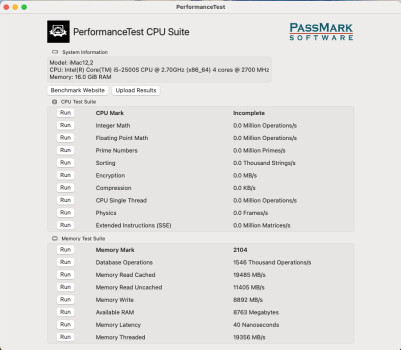
I modified the EFI to enable DDR3 1600 instead of maxing out at DDR 1333. It could be placebo but I swear the system feels much smoother (Nvidia K2000M + Sonoma). Memory benchmark shows 40ns latency (saw 3x when I first booted up. Perhaps the system adapted?) Prior to update, it was ~45ns.

Screenshot 2026-03-14 at 7.59.14 AM.pngScreenshot 2026-03-14 at 8.40.50 AM.png

Upgrade Process

All the EFI mods are here.


Did 1600 RAM upgrade and also tried to EnableGop but was unsuccessful (DXEInject ran but didn't generate output file and no error msgs, perhaps my ME cleaned EFI is somehow not perfectly original? Read that it needs to be somewhere)

Download
Extract original EFI

Use flashrom with CH341A just like VBIOS
flashrom --programmer ch341a_spi -r my_bios.img -c MX25L6406E/MX25L6408E

Look at the chip for PN and supply with -c argument with flashrom to work.

Patch EFI

UEFIPatch my_bios.img ddr3-freq-limit-1600.txt -o new_bios.img

I didn't choose disable version as documentation said not all RAMs will run and no benefit > 1600 anyways. With newer macOS app security (I was on Sequoia) need grant permission to run UEFIPatch

Flash modded EFI to iMac

flashrom --programmer ch341a_spi -w new_bios.img -c MX25L6406E/MX25L6408E

====

Than change RAM to DDR3 1600 (PC3-12800). Boot and enjoy hopefully more than placebo effect 🙂

I'll be doing this mod with all iMac 12,2 12,1 going forward and use PC3-12800 RAMs.

Issues

Did the upgrade to 2x 12,2 Both seem to have rare random faint clicking sounds from the speaker. Not really an issue. Maybe related as it seem not present before.
 
Last edited:
  • Like
Reactions: seb20137
@howardc64

Interesting. Thanks for sharing. I have the same Mac model as yours with the sam GPU upgrade. But I upgraded the CPU to an i7. But I am using Sonoma as well.

I don't know why, but after like half an hour or so the screen of mine just turns off while the system is running. I don't know if it's the GPU just turning off or the screen. But I think it's heat related. I replaced the thermal paste by Arctic MX6. Adjusted the fans via macsfancorntrol so they kick in sooner to keep temps low but nothing helps. The system has become so unreliable that I just can't use it no longer.

I wonder if I should just put the Radeon HD 6970M back in. Really weird.
 
@howardc64

Interesting. Thanks for sharing. I have the same Mac model as yours with the sam GPU upgrade. But I upgraded the CPU to an i7. But I am using Sonoma as well.

I don't know why, but after like half an hour or so the screen of mine just turns off while the system is running. I don't know if it's the GPU just turning off or the screen. But I think it's heat related. I replaced the thermal paste by Arctic MX6. Adjusted the fans via macsfancorntrol so they kick in sooner to keep temps low but nothing helps. The system has become so unreliable that I just can't use it no longer.

I wonder if I should just put the Radeon HD 6970M back in. Really weird.

Maybe backlight failure? But if didn't happen before i7+K2000M upgrade, then either LED solder joint connection weakened from the handling (see below) or coincidence or failure somewhere else. But given the high frequency of backlight failures in the exact same panel in Thunderbolt Displays. It's worth checking.

I have seen and fixed many Thunderbolt Display screen blanking failures and 1x 09-11 iMac 27" (don't remember exact year but doesn't matter since all same LCD). These all use same LG 27" LCDs. Failure is cracked LED connector brittle lead-free solder joint from heat. TB Display fail more due to more artists usage and therefore on longer compared to the iMacs 27s. But iMac 27 will fail exact same way if screen (backlight more accurately) has been on heavily throughout life time. One test is to dim or brighten the backlight and see if blanking out behavior changes. If less occurrence with dim and more with brighter... then its definitely backlight. On TB Display, when backlight fails, PSU will disable backlight due to too much power demand but pixels are also not drawn anymore (flashlight test reveal no image) On iMac, I'm not sure pixels is also not drawn. You could try flash light test to see if see any image when it goes dark.

One TB Display I fixed had the LED connector fell off as soon as anything tugged on it.

I left info including repair guide in post #1 FAQ Q18
 
Last edited:
@howardc64 I don't think it's that. Because as soon as I power cycle the system, the display is working again. I also have a dead 2010 27" iMac and it definitely has the issue with the broken backlight connector so that the left half of the screen is darker than the right side. But that's not the case on my 2011 imac.

Anyway, I have a CH341A programmer and a clamp to attach to the BIOS ROM chip and I woould like to try the RAM Speed unlock. But in the tutorial there are no pictures so I am having a hard time location the BIOS ROM chip. Is it located on the side with the CPU socket or on the side with the cmos battery?

EDIT: I've added shikigva=40 boot-arg and for now, the display stays on. I guess, i have to let the system run over the day to see what happpens.
 
Last edited:
@howardc64 I don't think it's that. Because as soon as I power cycle the system, the display is working again. I also have a dead 2010 27" iMac and it definitely has the issue with the broken backlight connector so that the left half of the screen is darker than the right side. But that's not the case on my 2011 imac.

Anyway, I have a CH341A programmer and a clamp to attach to the BIOS ROM chip and I woould like to try the RAM Speed unlock. But in the tutorial there are no pictures so I am having a hard time location the BIOS ROM chip. Is it located on the side with the CPU socket or on the side with the cmos battery?

EDIT: I've added shikigva=40 boot-arg and for now, the display stays on. I guess, i have to let the system run over the day to see what happpens.
imac-11.jpg
 
  • Like
Reactions: 5T33Z0
@howardc64 I don't think it's that. Because as soon as I power cycle the system, the display is working again. I also have a dead 2010 27" iMac and it definitely has the issue with the broken backlight connector so that the left half of the screen is darker than the right side. But that's not the case on my 2011 imac.

Anyway, I have a CH341A programmer and a clamp to attach to the BIOS ROM chip and I woould like to try the RAM Speed unlock. But in the tutorial there are no pictures so I am having a hard time location the BIOS ROM chip. Is it located on the side with the CPU socket or on the side with the cmos battery?

EDIT: I've added shikigva=40 boot-arg and for now, the display stays on. I guess, i have to let the system run over the day to see what happpens.

Hope that solves it for you. But just some stats for the backlight failure
  • Have done 20+ TB Display repairs
  • All failures I've seen blanks out the screen completely. Only had 1 that had a single LED failure that was visibly noticeable. Rest just blanks out at varying amount of brightness. I've actually never seen one that's out only on 1 side. I think (not sure) PSU will shutdown both side backlights when it detects over current (even just one side) so just one side out is quite strange and I've not seen.
  • Vaguely recall every power cycle would come back on before eventually blanking out again. I think all power cycle does is restart the system state and since backlight solder joint current have cooled for awhile since blanking out, it often starts with working until heating up again.
anyway, hope your boot-arg mods do fix it for you. Just providing repair stats for reference.
 
  • Like
Reactions: Nguyen Duc Hieu
@howardc64 So far, the display stays on. But since I get a lot of artifacts when h265 codec is used on macOS Sonoma in Firefox, I installed Big Sur which doesn't require root patching with OCLP and everything is working fine.

I managed to obtain the BIOS Rom from the iMac12,2 mainboard with NeoProgrammer under Windows. But it's a .bin file, not an .img file (I don't know if this matters). I want to apply the 1600 MHz RAM Speed mod to it.

Next I patched it with UEFIPatch but I don't know if this is correct. Here's the output:

Code:
C:\Users\5T33Z0\Downloads\UEFIPatch_0.28.0_win32>UEFIPatch default_rom.bin ddr3-freq-limit-1600.txt -o new_bios.bin
parseVolume: unknown file system E3B980A9-5FE3-48E5-9B92-2798385A9027
parseVolume: unknown file system 153D2197-29BD-44DC-AC59-887F70E41A6B
parseVolume: unknown file system FFF12B8D-7696-4C8B-A985-2747075B4F50
patch: replaced 6 bytes at offset D81h 66C740013505 -> 66C740014006
Image patched

I haven't flashed the ROM file back yet.
 
@howardc64 So far, the display stays on. But since I get a lot of artifacts when h265 codec is used on macOS Sonoma in Firefox, I installed Big Sur which doesn't require root patching with OCLP and everything is working fine.

I managed to obtain the BIOS Rom from the iMac12,2 mainboard with NeoProgrammer under Windows. But it's a .bin file, not an .img file (I don't know if this matters). I want to apply the 1600 MHz RAM Speed mod to it.

Next I patched it with UEFIPatch but I don't know if this is correct. Here's the output:

Code:
C:\Users\5T33Z0\Downloads\UEFIPatch_0.28.0_win32>UEFIPatch default_rom.bin ddr3-freq-limit-1600.txt -o new_bios.bin
parseVolume: unknown file system E3B980A9-5FE3-48E5-9B92-2798385A9027
parseVolume: unknown file system 153D2197-29BD-44DC-AC59-887F70E41A6B
parseVolume: unknown file system FFF12B8D-7696-4C8B-A985-2747075B4F50
patch: replaced 6 bytes at offset D81h 66C740013505 -> 66C740014006
Image patched

I haven't flashed the ROM file back yet.

I re-ran UEFIPatch on both 12,2's ME cleaned EFI and both get same output as you

Code:
xxx@Howards-iMac UEFIPatch_0 % ./UEFIPatch outimage.bin ddr3-freq-limit-1600.txt -o outimage1600.bin
parseVolume: unknown file system E3B980A9-5FE3-48E5-9B92-2798385A9027
parseVolume: unknown file system 153D2197-29BD-44DC-AC59-887F70E41A6B
parseVolume: unknown file system FFF12B8D-7696-4C8B-A985-2747075B4F50
patch: replaced 6 bytes at offset D81h 66C740013505 -> 66C740014006
Image patched
 
  • Like
Reactions: 5T33Z0
Register on MacRumors! This sidebar will go away, and you'll see fewer ads.