Become a MacRumors Supporter for $50/year with no ads, ability to filter front page stories, and private forums.
A Mac Mini was my first choice, but when I realized I would need the Mac Mini M4 Pro at $1800, it brought me close to the price of a Studio M4 Max from the Refurb Store with a Veterans discount. So, I went with the Studio.

Still, I am toying with getting a Mac Mini for a work bench were I do some testing and developing. There is nothing wrong with the Mac Mini; it is an excellent machine. I am glad the OP has gotten good use out of his.
 
  • Like
Reactions: Cape Dave
Moved house, currently my desk is in the dining/living room so rather than using my loud PC which would annoy the other half, grabbed a base M4 Mac Mini on Black Friday and have to say pretty impressed with it.

Also getting use to MacOS found fixes for most things and some software niggles, but still got some outstanding, but performance wise more than happy, WoW seems to run fine at 4K I do not really raid so seems fine for me, Steam games and Crossover games work all ok as well.

My plan was when get the garage converted over to my home office was to get a Studio but not sure if I need to get one.

Kimbie
The mini is quite capable. It’s getting to the point where the only people who need a studio know that they need a studio because it’s for extremely demanding workloads. The mini can accomplish quite a bit
 
My friend with the majority of positives about the M4 mini, it is inevitable there will be at least one nay sayer.
The law of averages almost demands it.
I have an M4 mini and I love it. But I don’t game on my Mac, because they suck for it. You’re kidding yourself if you think the Mac’s ever going to be viable for serious gaming
 
Last edited:
  • Like
Reactions: chmania
I have an M4 mini and I love it. But I don’t game on my Mac, because they suck for it. You’re kidding yourself if you think the Mac’s ever going to be viable for serious gaming
My friend I have no illusions about playing games on an Intel P/C let alone on my Mini.
If you look back on one of my posts, you will see I have never professed to being a Gamer or the aspirations to become one.

Even at the beginning of my hobby of buying components and then stuffing it all into a P/C case, the closest I have come to playing a game is Windows Solitaire and then Tetris. Those two alone completed my fantasised notion of being a Gamer.
I later progress to installing macOS Snow Leopard onto the same system using the Chameleon boot-loader.

Here on late after installing Tahoe using Open-core, although succeeded, many obstacles has to be overcome with every Update so I decided to call it quits and got the Mini. Now that I'm in my twilight years, my uses (which hasn't changed much) are web browsing, sending the occasional email and editing my Drone (my passion) video footage.

I am contented to leave Gaming to the youngsters and applaud their prowess. I'm very contented with what this little box offers that satisfies my needs which also takes up a minuscule fraction of the space used by the ATX PC Desktop.
Sorry for the long winded synopsis of my computing experience but that's it in a nut shell.
Cheers.
 
I absolutely adore my MacMini M4, especially the Factor that allowed me to upgrade the internal storage with the Aftermarket Storage 2TB for just an additional $250. This resulted in a Base Mini for $500 plus the $250, making it a 16GB/2TB Mini for just $750.

I’ve even gone as far as programming a local LLM Translator that can be used with dedicated audio output from apps or even mic input to translate between and from 90 languages.

It just runs smoothly and efficiently.

The Mini is stuck under the Desktop, so it can blow Air free to the ground, and I’ve never heard the fan. 😎

@Kimbie

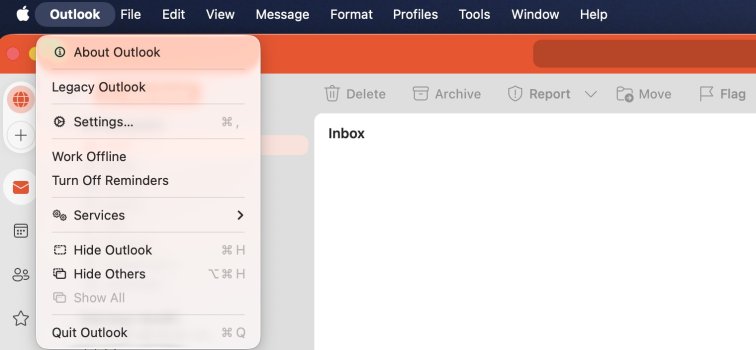
By the way, I think you use the new Outlook version. I still use the old Outlook Legacy version, and there’s a chance we can keep it that way for now on MacOS. It also has calendar sharing, which doesn’t work in the new version.

__________________

How to Switch to Legacy Outlook on macOS via Terminal​

If the option to switch to Classic/Legacy Outlook is no longer available in the Outlook settings, you can force the change using Terminal commands.

Switch to Legacy Outlook​

  1. Open Terminal (Applications → Utilities → Terminal)
  2. Run this command:
    defaults write com.microsoft.Outlook EnableNewOutlook -bool false

  3. Quit Outlook completely (Cmd+Q, not just closing the window)
  4. Restart Outlook - it should now open in Legacy mode

Switch Back to New Outlook​

defaults write com.microsoft.Outlook EnableNewOutlook -bool true

Then quit and restart Outlook.

Reset to Default Setting​

defaults delete com.microsoft.Outlook EnableNewOutlook

Troubleshooting​

If the command doesn't work, you can check current Outlook settings with:

defaults read com.microsoft.Outlook | grep -i outlook

Important Note: Microsoft has been phasing out Classic Outlook in newer versions. If this command doesn't work, it may mean:

  • Your Outlook version no longer supports the Legacy interface
  • You may need to downgrade to an earlier Office/Outlook version
  • Microsoft has completely removed Legacy Outlook support from your version

Verify Current Version​

To check which Outlook version you're running:

  • Open Outlook → Outlook menu → About Outlook

 
My friend I have no illusions about playing games on an Intel P/C let alone on my Mini.
If you look back on one of my posts, you will see I have never professed to being a Gamer or the aspirations to become one.

Even at the beginning of my hobby of buying components and then stuffing it all into a P/C case, the closest I have come to playing a game is Windows Solitaire and then Tetris. Those two alone completed my fantasised notion of being a Gamer.
I later progress to installing macOS Snow Leopard onto the same system using the Chameleon boot-loader.

Here on late after installing Tahoe using Open-core, although succeeded, many obstacles has to be overcome with every Update so I decided to call it quits and got the Mini. Now that I'm in my twilight years, my uses (which hasn't changed much) are web browsing, sending the occasional email and editing my Drone (my passion) video footage.

I am contented to leave Gaming to the youngsters and applaud their prowess. I'm very contented with what this little box offers that satisfies my needs which also takes up a minuscule fraction of the space used by the ATX PC Desktop.
Sorry for the long winded synopsis of my computing experience but that's it in a nut shell.
Cheers.
Fair enough, I’m not saying it’s not possible, it’s just if you are playing proper games (solitaire doesn’t count haha) the Mac is not what you want to be using
 
  • Like
Reactions: eSaF-Eddie

Verify Current Version​

To check which Outlook version you're running:
  • Open Outlook → Outlook menu → About Outlook
And whilst you are there, you check just click 'Legacy Outlook'. This is the latest version from Mac App Store.

Screenshot 2026-01-28 at 20.33.22.jpeg
 
And whilst you are there, you check just click 'Legacy Outlook'. This is the latest version from Mac App Store.
Hey, so I was a bit annoyed by the constant reminders to update the version, so I decided to take matters into my own hands and use the Terminal Command.

I have no idea what the Menu from the New Version is actually looking like 🙂

By the way, I’m curious, why aren’t you using the Legacy Version if you’re missing out on certain functions?
 
@Kimbie
If you come from PC and missing window previews in the dock and in Alt+Tab etc. Check Dockdoor for Mac. It's free and Open Source.
As an alternative (i.e., window previews but not per app):
I have it set to a Hot Corner.

macOS has keyboard shortcuts too but is a bit of a ballache teaching yourself when moving from windows. I remember the pain but it’s worth the gain!
and some of those key-combinations require a bit of finger gymnastics imo
True, but keyboard shortcuts are typically a great efficiency, and seemingly much more second nature on a Mac.
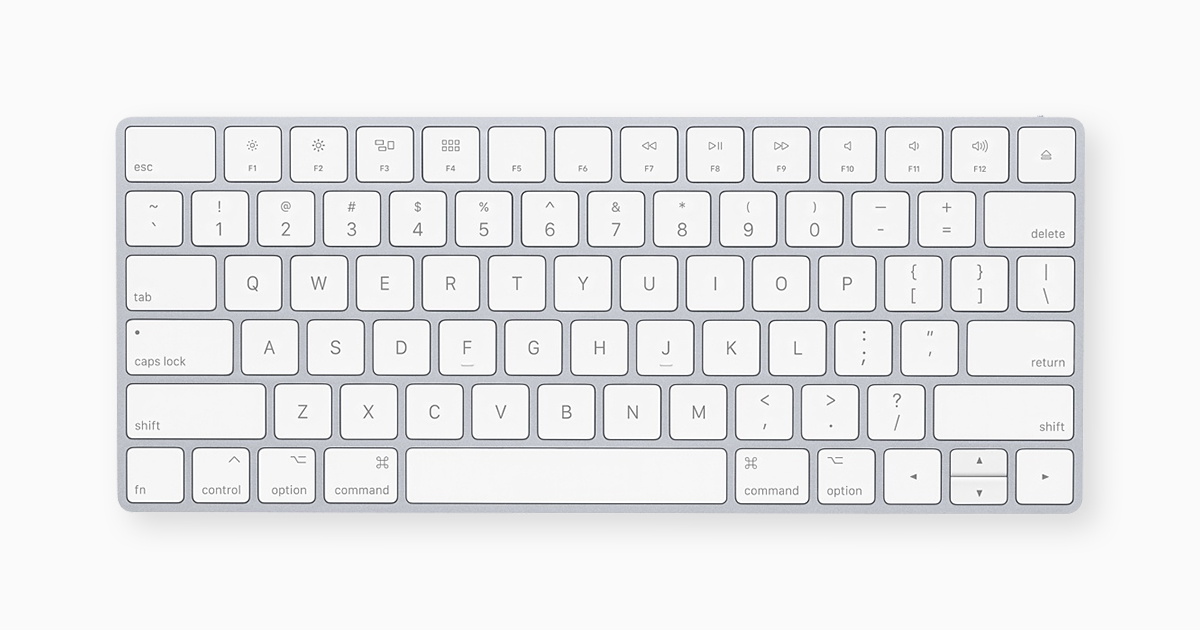
The keyboard shortcuts on mac are better since the Command key is closer to C and V. Command and space is also invaluable for search. Command is just so natural. Feels awkward now whenever I go back to Windows and use Control.
Could be the/a reason. I think, overall, Mac OS/macOS has focused on the usage. From what I recall, it’s a pastime for anyone introducing someone to a Mac to teach keyboard shortcuts from the very beginning. As I said, it seems second nature for most Mac users.


...

 
Doesn't work for me. With it properly configured lol
On second thought, I think mine shows UNREAD, not new messages. I am going to mark ALL READ and then see what happens. OK, I did that, and now there are NO indicators. Damn, that sucks! It does seem to work on my mac mini.

OK, it is now working perfectly. Pro 15, whatever IOS that comes before tahoe.I toggled some settings off and on again. That seemed to help. Or, rather, fix it!
 
Last edited:
Im still using my dual intel based 2018 mac minis with dual egpu's for the last two years and no problems. One is on Windows 10 bootcamp for games and the other is on Monterey OS for OBS streaming. No need to upgrade currently since the i7-8700 cpus with 32 gbs can run over 90% current games out there for windows and OBS just needs a decent CPU for 1080i output.
 
I bought the M4 mini in December 2024 and have been very happy with it. I debated over the M4 or M4 Pro for a while, but settled on the M4 because I knew I wasn't going to tap into the M4 Pro. I moved Handbrake to my Ubuntu mini PC and gaming I primarily do at my desk is World of Warcraft and emulation.

With it having the Thunderbolt ports plus sipping power I plan on turning it into a server when the time comes for me to upgrade. I'll probably run a FreeBSD VM for ZFS and passthrough a Thunderbolt port for mass storage.
 
I bought the M4 mini in December 2024 and have been very happy with it. I debated over the M4 or M4 Pro for a while, but settled on the M4 because I knew I wasn't going to tap into the M4 Pro. I moved Handbrake to my Ubuntu mini PC and gaming I primarily do at my desk is World of Warcraft and emulation.

What's the deal with Handbrake: are you saying the mini-PC running Linux has the edge? I perceive Handbrake as very fast on the M4 10-core - silent too, couldn't imagine my Ryzen 7-based Linux mini-PC would be able to beat it, even with the fan screaming.

Edit: very close in my case.
 
  • Like
Reactions: eSaF-Eddie
buying a windows laptop with a Nvidia graphics card is close to buying a console gaming device, no need to install components except maybe larger SSD.
Actually the new panther lake laptops have an incredible GPU, and one that rivals gaming laptops.
 
buying a windows laptop with a Nvidia graphics card is close to buying a console gaming device, no need to install components except maybe larger SSD.
For the risk of straying away from the Mac M4 mini subject matter, my hobby entailed constantly buying the new and latest PC components from PSU to PC case chasing perceived Hackintosh efficiency and stability.

As I alluded to in an earlier post, with the introduction of Tahoe and it's limited OS functions on Intel platforms plus the numerous patches one has to employ just to get some semblance of a satisfactory result became a hill too far for me to continue climbing hence the reason I fully embraced Apple via the M4 Mini.

Call me a Johnny come lately Apple fan boy but as soon as the M5 Mini becomes available, I will pass this M4 down to a relative and purchase one. That is how impressed I am with this little unit with the thought that it can only get better with the M5.
 
Last edited:
  • Like
Reactions: mitya and smithrh
Lol if you’re trying to game on the Mac you’re doing it wrong
I first played the Jedi Outcast/Academy and KotOR on my Macbook (2007) using CrossOver and had a blast. For people with smaller gaming needs I can't see Macs sucking too much. But I get your point and you're not exactly wrong lol.
 
The mini is quite capable. It’s getting to the point where the only people who need a studio know that they need a studio because it’s for extremely demanding workloads. The mini can accomplish quite a bit
Agreed. The Mac Studio is like a fork lift truck, you only need it if you know you really need it. For every other user the Mac Mini is good enough.
 
Register on MacRumors! This sidebar will go away, and you'll see fewer ads.