Become a MacRumors Supporter for $50/year with no ads, ability to filter front page stories, and private forums.
@ForkHandles, I see what you did there: "The Mac Studio is like a fork lift truck"

I both agree and disagree with that perspective.

The base Mini offers excellent price-to-performance value. If your Mac usage is limited to Facebook, web browsing, and light office work, it’s a perfectly reasonable choice. However, anything beyond light use will quickly expose the Mini’s limitations. This becomes apparent even with something as common as having multiple browser tabs open, where the system can noticeably bog down.

The Studio, on the other hand, offers significantly more headroom. Overall, I think it’s a strong option compared to both the iMac and the Mini when you consider its pricing and what you get for the money. It’s less about inherently “needing” a Studio and more about properly configuring a system based on your actual needs—something that applies to any computer purchase, not just the Mini versus Studio decision.
 
  • Like
Reactions: eSaF-Eddie
Agreed. The Mac Studio is like a fork lift truck, you only need it if you know you really need it. For every other user the Mac Mini is good enough.
Truth. Coming from a guy who’s always had the large size MBP but will definitely be going to a 14” M5 or M6 MBP next time. Very capable machine. More than enough for me. By today’s standard I definitely only need a golf cart vs. a fork lift
 
@ForkHandles, I see what you did there: "The Mac Studio is like a fork lift truck"

I both agree and disagree with that perspective.

The base Mini offers excellent price-to-performance value. If your Mac usage is limited to Facebook, web browsing, and light office work, it’s a perfectly reasonable choice. However, anything beyond light use will quickly expose the Mini’s limitations. This becomes apparent even with something as common as having multiple browser tabs open, where the system can noticeably bog down.

The Studio, on the other hand, offers significantly more headroom. Overall, I think it’s a strong option compared to both the iMac and the Mini when you consider its pricing and what you get for the money. It’s less about inherently “needing” a Studio and more about properly configuring a system based on your actual needs—something that applies to any computer purchase, not just the Mini versus Studio decision.
That’s an interesting perspective on the Mac mini, the tasks you describe I can do easily enough on my 2012 MacBook Pro i5.
My M1 Pro MacBook is used all the time for xCoding, 3D rendering, Final Cut Pro, as well as more regular home computing. It never misses a beat!

I wonder if your model has some sort of defect in it?
 
Base M4 Mac Mini is one of the best tech buys, such great value for the money. Sold my 4 year old high end PC after I got the mini. The mini literally smoked it.

The only thing I hate is the random monitor signal dropouts for 1 second over HDMI. Even running through a thunderbolt dock, it still happens but not as much. Never once has this ever happened on windows. I have my Mini running 3 monitors.
 
Last edited:
The only thing I hate is the random monitor signal dropouts for 1 second over HDMI. Even running through a thunderbolt dock, it still happens but not as much.
Hiya, what you described is very strange indeed.
The HDMI connection from my Mini to monitor is problem free and perfect.

Having a decent and a bit more expensive HDMI cable rather than a run of the mill one would help in my opinion.
Try a different one to see if the problem is solved.

Cheers.
 
  • Like
Reactions: Cape Dave
The only thing I hate is the random monitor signal dropouts for 1 second over HDMI. Even running through a thunderbolt dock, it still happens but not as much. Never once has this ever happened on windows. I have my Mini running 3 monitors.

Yeah I saw those too even with a good cable, seems the HDMI port or the software-side is problematic. Not acceptable at all dealing with that IMO.

If going with USB-C to Displayport is an option I'd recommend skipping HDMI entirely on this machine. Solved the issue on my end.
 
What's the deal with Handbrake: are you saying the mini-PC running Linux has the edge?
Absolutely not. I was considering the M4 Pro for Handbrake before setting up the Handbrake docker container, which is on that Ubuntu server. For me it was either buy a faster main PC so that Handbrake jobs would finish faster or use a PC I already had and accept that jobs would take longer. The M4 is still faster regardless but I send things off to Handbrake infrequently, usually for long queues of media I have ripped from Blu-ray or DVDs, so it doesn't bother me that the Ubuntu server running the Handbrake Docker container isn't as fast. It just requires a bit of patience, and if I really need something done fast the M4 takes care of it.
 
  • Like
Reactions: th0masp
I wonder if your model has some sort of defect in it?
I don't think so, but at this point, is water under the dam, as I returned the mini and bought a Studio - no ragrets, either. I absolutely love the studio
1770040907206.png
 
That’s an interesting perspective on the Mac mini, the tasks you describe I can do easily enough on my 2012 MacBook Pro i5.
My M1 Pro MacBook is used all the time for xCoding, 3D rendering, Final Cut Pro, as well as more regular home computing. It never misses a beat!

I wonder if your model has some sort of defect in it?
I thought the same. Those task can even be made on a Macbook 12".

a M4 should be able to do a lot more things, more professional task without problem.
 
Yeah I saw those too even with a good cable, seems the HDMI port or the software-side is problematic. Not acceptable at all dealing with that IMO.

If going with USB-C to Displayport is an option I'd recommend skipping HDMI entirely on this machine. Solved the issue on my end.

I even spent $30 to get an Anker HDMI cable and it fixed the dropouts from before when on PC. I read some user on here had the same issue and getting this specific Anker HDMI cable fixed the issue for him. So I ordered one. With my old cable, even though it was good quality cable, each time I would touch the keyboard (because of static) it would cause my monitor to go black for 1 second every time and it drove me nuts. The HDMI cable that I was using must not be shielded. I have tons of HDMI cables and I really didn't want to have to buy another one but I had no choice.

I'm running two of my monitors through thunderbolt to Display port on the monitors. And it will still drop out for a second but nowhere near as often as the one going through HDMI. I've been tracking it and over the last four months, my HDMI monitor has dropped out 34 times. My other two monitors running through the thunderbolt dock have disconnected 5 times total. So it's definitely an improvement (but not perfect) running through a thunderbolt dock.

Unfortunately all my thunderbolt ports on my dock and my mini have been used up. I just don't want to have to buy another thunderbolt dock just to run my one monitor through it. It's not urgent for me but I possibly will if I can get a good deal on another dock. It's unfortunate that the HDMI port can't work properly on something that we pay for when buying the mini.
 
Last edited:
Hiya, what you described is very strange indeed.
The HDMI connection from my Mini to monitor is problem free and perfect.

Having a decent and a bit more expensive HDMI cable rather than a run of the mill one would help in my opinion.
Try a different one to see if the problem is solved.

Cheers.

Lots of people on here have the same problem with the HDMI port on their minis. Oh well good thing the machine is cheap. But as soon as you start adding accessories like docks and drives it quickly drives up the cost. But if I had to do it all over again I would still take the same route. Still a banging machine and it greatly cuts back on wear and tear on my M4 MacBook Pro at home. I don't think I could ever go back to a machine that has an audible fan. Having pure silence while using the mini is heavenly bliss.
 
Last edited:
Lots of people on here have the same problem with the HDMI port on their minis.
I am very surprised by this. I am very new to actually owning and running an Apple PC.
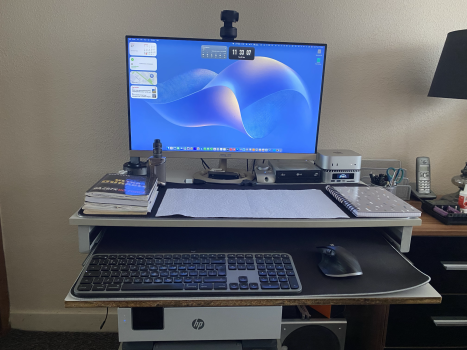
The transition from Intel (Hackintosh) couldn't be easier. I bought a RayCue dock for the port expansions and speaker plug in outlet at the back freeing up the front one on the Mini.

The HDMI connection is from the Dock itself to an Asus monitor and I have zero problems as described.
Although it came preloaded with Sequoia, (owing to old Hack habit), I clean installed Tahoe and is now running the latest Beta and once again, with zero problems.
 

Attachments

  • tempImageeG3n95.png
    tempImageeG3n95.png
    3.3 MB · Views: 7
You have a great little system.
I just love my Mini Pro, it does everything I need. My gaming is not on the level that requires complaints about performance, the games I play run just fine. I will admit I did briefly think briefly about return and upgrade to the Studio. I realized that it did everything I need. As far as the HDMI, it runs the Benq Mobius 38" 4K just fine, never a drop out, (I did buy an aftermarket 4K Rockfish cable, it had drops, replaced with the cable from Benq, not a drop since then). Light iMovie, GB. DVD conversions. Games. Very Happy.
 
  • Like
Reactions: eSaF-Eddie
I honestly think the reported HDMI problems is perhaps down to the make/type of monitor perhaps pertaining to the refresh rate and/or the HDMI cable.

I would definitely find it discerning with picture or video quality dropouts no matter how infrequently it happens.
Coming from a PC tinkering background, I would be compelled to find and fix the problem.
 
  • Like
Reactions: Cape Dave
Register on MacRumors! This sidebar will go away, and you'll see fewer ads.