
Become a MacRumors Supporter for $50/year with no ads, ability to filter front page stories, and private forums.
Status
The first post of this thread is a WikiPost and can be edited by anyone with the appropiate permissions. Your edits will be public.
In Beta 7 across OS releases, Apple added new infrastructure to support dynamic wait time messages when a user joins the Siri AI waitlist.
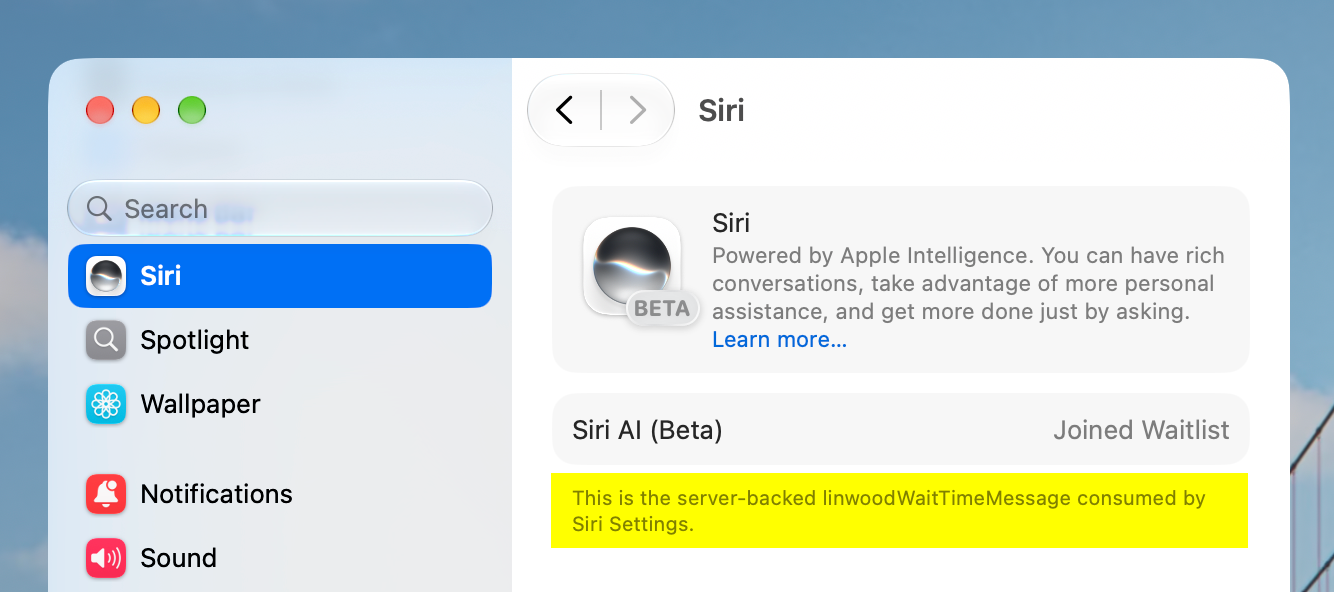
 
Some notes summarized a bit:

Security & networking

  • New baseline: system processes tied to MDM, device enrollment, config profile installs, app installs, and software updates now require TLS 1.2 minimum with ATS-compliant ciphers/certs — could break connections to non-compliant servers in managed environments.
  • Fixed: ACME certificate issuance and Managed Device Attestation enrollment were failing outright.
  • Fixed: sensitive QR code detection wasn't flagging content correctly for third-party testing.
Apple Intelligence / Siri / Core AI

  • Neural Engine background access now needs a new entitlement (com.apple.developer.background-tasks.continued-processing.inference); NE memory use is now attributed to your app instead of the system.
  • Foundation Models: fixed excessive tool-calling loops, Private Cloud Compute failing in simulators, and PrivateCloudComputeLanguageModel being stuck on greedy decoding.
  • A long tail of Siri fixes — contact disambiguation, list/reminder creation, email composition errors, Mail sender photos/names not showing. Notably: a bug where some ChatGPT-via-Siri responses used in follow-ups "might be logged by Apple" is now fixed.
  • Dictation: new on-device model (toggle "Advanced Dictation Preview" in Keyboard settings) for better accuracy.
HealthKit

  • New heart rate/cycling power zones, an updated permissions flow (limited vs. full history), and new menopausal-state/bleeding-after-menopause tracking types.
Apple Wallet — worth knowing if you're on the beta track

  • Updating to Beta 3 or 4 could cause Digital ID to expire and become unusable across every device signed into the same Apple Account, not just the updated one. That's fixed now, but a reminder of how disruptive beta updates can be to Wallet-based ID.
SwiftUI / UIKit (dev-facing, given your VS Code/Cursor/Claude Code stack)

  • Document handling is overhauled: new ReadableDocument/WritableDocument/Document protocols replace FileDocument/ReferenceFileDocument (now deprecated), with async read/write and progress reporting.
  • @State now uses a new macro-based implementation that stops re-evaluating initializer expressions on every view re-instantiation — a real behavioral change, and it back-deploys to iOS 17-aligned OSes. A few init patterns that used to compile now won't (see the SwiftUI section for the exact pattern).
  • Apps built with the 27 SDK must include a launch screen or get rejected at App Store submission, and must adopt the scene-based lifecycle or fail to launch entirely.
Everyday app fixes

  • Mail: banner mismatches and false "delayed" flight banners fixed (note: Mail still can't search body content older than 6 months — that's an unresolved known issue, not new).
  • Safari: tab bar vanishing bug and extension toggle-not-taking-effect bug fixed.
  • Files: couldn't delete/rename files with certain Unicode names — fixed.
  • Camera: Portrait mode blur rendering incorrectly — fixed.
Still open (known issues, not resolved this beta)

  • CarPlay Siri lag under heat/poor signal.
  • Status bar blur glitch (workaround: restart).
  • Siri still can't target photos by number ("photo one") and may misapply commands to unselected search results.
Full source: Apple's iOS & iPadOS 27 Release Notes.
There is no such setting:
  • Dictation: new on-device model (toggle "Advanced Dictation Preview" in Keyboard settings) for better accuracy.
CC
 
There is no such setting:
  • Dictation: new on-device model (toggle "Advanced Dictation Preview" in Keyboard settings) for better accuracy.
CC
Yeah, those summarized notes are Beta 1-7, even though they say Beta 7, i.e. of limited use. The toggle was a thing back in Beta 1&2, now automatically enabled:
No longer an option. Since Beta 3, Advanced Dictation Preview is now automatically enabled on iPhone Air, iPhone 17 Pro, and iPhone 17 Pro Max. The Advanced Dictation Preview option in Keyboard settings has been removed.

You might have to wait until the "Apple Intelligence assets need to finish downloading." message disappears under the ChatGPT setting in Settings > Siri to use the new dictation model.

You can check if you're using Advanced Dictation by inspecting the logs your iPhone creates while dictating. Connect your iPhone to a Mac and open the Console app on your Mac. In the sidebar, select your iPhone, start the log streaming, and type FoundationModelTranscriber in the search bar. Start a dictation on your iPhone. You’ll see “Using FoundationModelTranscriber for this request” if your iPhone is using the new Advanced Dictation models.

Note that the model is English-only (com.apple.fm.language.instruct_3b.asr_natural_dictation_speech?language=en).
 
for me the watch beta has been good except for siri being slow on ultra 3 i wonder if the reason for the speculated processor bump for the new watches coming out are for the new siri. most of the issues ive had on the beta has been with the new siri
Me too. Siri very slow on Ultra 2
 
Has your indexing finished ? Lmao 🤣
Installed and now I guess it’s doing it’s indexing. Plugged in and just letting it be for a bit, also joined Siri Beta. I don’t think it’s easy to judge this quickly after a major update. So time will tell. Seems pretty good though.
 
I saw some said some bugs they had are not resolved yet - these releases are feature complete at this point, don’t expect any more bug fixes to the issues you’re currently having.

Look for 27.1+ for those.
Well feature complete probably. But bug fixes for what is already there should definitly see some love.


View attachment 2655415View attachment 2655416
Pretty insignificant but it annoys me that all my AirTags show address unavailable. Been an issue since beta 1. I attached iOS 26 for comparison.
If you click on the device with "no address" it actually shows the address.

I hear ya.. that would be a drag. I've never had the issue myself, so I'm wondering.. have you tried to unpair these and refresh the pairing again?
Seems to be fixed for me with B7. Only one airtag had the issue for whatever reason. Now they show as normal. Hopefully B7 will resolve this issue for all.
 
Well feature complete probably. But bug fixes for what is already there should definitly see some love.


If you click on the device with "no address" it actually shows the address.


Seems to be fixed for me with B7. Only one airtag had the issue for whatever reason. Now they show as normal. Hopefully B7 will resolve this issue for all.
What’s strange is that the AirTags show correctly as “home” when I’m not home. But if I’m home, it shows unavailable lol
 
Anyone having issues with WiFi? Very slow on part of the house and then later on in the car. Will do a hard reset (vol up, down, power). If that doesn’t work I’ll do a network reset
 
IMG_8137.jpeg
 
  • Like
Reactions: WildstarBR2020
Register on MacRumors! This sidebar will go away, and you'll see fewer ads.