Got a tip for us?
Let us know
Become a MacRumors Supporter for $50/year with no ads, ability to filter front page stories, and private forums.
macOS 13: Working and broken apps
- Thread starter walterpaisley
- WikiPost WikiPost
- Start date
- Sort by reaction score
You are using an out of date browser. It may not display this or other websites correctly.
You should upgrade or use an alternative browser.
You should upgrade or use an alternative browser.
- Status
- The first post of this thread is a WikiPost and can be edited by anyone with the appropiate permissions. Your edits will be public.
Version 8.3.9 working fine for me.Hi All, I have issues with latest version of Cyberghost and Ventura. Tried in M1 MbAir and M1Max MBPro. It doesn’t work. Try uninstalling and re installed. No luck. Working fine in an Intel iMac with Monterrey. Any help would be appreciated it. Thank you in advance.
Hello, I'm new to Mac OS's and am running a MacBook Pro (15" 2017) with Venture 13.1. The latest Gimp 2.10.32 won't install for me. The installer window Gimp icon has a circle with a line through it, so I can't drag it to the Applications folder in the installer window. I tried dragging it manually to the Applications folder but the Gimp icon in the applications folder has a circle with a line through it as well. Any suggestions? Thx!Gimp 2.10.32 is working fine on Ventura.
Maybe you have the Apple Silicon version? The downloads page has separate downloads for Intel and Apple Silicon. https://www.gimp.org/downloads/The installer window Gimp icon has a circle with a line through it

flowrider
macrumors 604
^^^^Look at Post 7, 8 &9 here:
Guess it's not a universal issue?
Lou
Guess it's not a universal issue?
Lou

bogdanw
macrumors G3
Smart Scroll - Version 4.6.2 - February 14, 2023
"Various fixes and improvements for macOS 13 Ventura."
https://www.marcmoini.com/sx_en.html
"Various fixes and improvements for macOS 13 Ventura."
https://www.marcmoini.com/sx_en.html
I am running 13.3.1(a) on my new M2 pro Mac mini.
1. cDock won't work.
2. Bimp plug-in won't open or even won't show in Gimp's File menu.
3. LINE works only partially: when chat message is long and cut short the "see more" button when clicked won't open up the whole message pane.
Does anyone encounter the same? Any resolution?
1. cDock won't work.
2. Bimp plug-in won't open or even won't show in Gimp's File menu.
3. LINE works only partially: when chat message is long and cut short the "see more" button when clicked won't open up the whole message pane.
Does anyone encounter the same? Any resolution?

Thanks, galad.1. cDock website says it doesn't support M1 and M2 Macs.
2. Make sure the plug-in and Gimp are compiled for the same architecture, they need to be both arm or both intel.
3. No idea. Report the bug to the developers.
2. How do you do to make sure the plug-in and Gimp are compiled for the same architecture?

Captain_Seemo
macrumors newbie
I'm running 13.4 on my M1 Pro 2021 model (work laptop)
When I add my work (exchange) account in the setting and toggle Calendars on, I don't see my calendar/events in the native Calendar app. I've tried removing and re-adding the account multiple times, killing exchangesyncd process, clearing Calendar cache, toggling Calendars on/off in Internet Accounts, nothing seems to work.
I appreciate your help.
When I add my work (exchange) account in the setting and toggle Calendars on, I don't see my calendar/events in the native Calendar app. I've tried removing and re-adding the account multiple times, killing exchangesyncd process, clearing Calendar cache, toggling Calendars on/off in Internet Accounts, nothing seems to work.
I appreciate your help.

jagooch
macrumors 6502a
That doesn't work for my employer either, but I don't expect it to. They configured Outlook(Exchange) to not allow Apple Mail, Contacts, Calendar, or Reminders apps to access Exchange.I'm running 13.4 on my M1 Pro 2021 model (work laptop)
When I add my work (exchange) account in the setting and toggle Calendars on, I don't see my calendar/events in the native Calendar app. I've tried removing and re-adding the account multiple times, killing exchangesyncd process, clearing Calendar cache, toggling Calendars on/off in Internet Accounts, nothing seems to work.
I appreciate your help.
Your employer may have done the same. I'd check with your IT Support group for assistance.
Captain_Seemo
macrumors newbie
Thanks. I have no issues accessing/syncing my work email on the native Mail app. It works flawlessly, but not the calendar app for some reasonThat doesn't work for my employer either, but I don't expect it to. They configured Outlook(Exchange) to not allow Apple Mail, Contacts, Calendar, or Reminders apps to access Exchange.
Your employer may have done the same. I'd check with your IT Support group for assistance.

EugW
macrumors P6
Citrix Workspace/Viewer 2305, which just came out last week, fixes the frequent disconnects / reconnects I was getting on my Ventura M1 machine. I didn't have this problem on my Monterey or Ventura Intel machines.
 docs.citrix.com
EDIT:
Not completely gone. Mostly gone, but not 100% gone. 🙁
Oh well, now the brief disconnects are very infrequent, whereas before it was many times a day.
About this release | Citrix Workspace™ app for Mac
Learn about the new features, fixed issues, and known issues within Citrix Workspace app for Mac.
Citrix said:Fixed: When using Citrix Workspace app for Mac, external users might get disconnected from the sessions intermittently. [CVADHELP-22191]
EDIT:
Not completely gone. Mostly gone, but not 100% gone. 🙁
Oh well, now the brief disconnects are very infrequent, whereas before it was many times a day.
Last edited:
EugW
macrumors P6
Along with this fix is that an annoying pause I would get is gone.Citrix Workspace/Viewer 2305, which just came out last week, fixes the frequent disconnects / reconnects I was getting on my Ventura M1 machine. I didn't have this problem on my Monterey or Ventura Intel machines.
About this release | Citrix Workspace™ app for Mac
Learn about the new features, fixed issues, and known issues within Citrix Workspace app for Mac.
After first launching older versions of the Citrix Viewer, with my first text entry, I'd get the beachball for several seconds. After the beachball went away, text entry would work fine (aside from the intermittent disconnects referenced above in the fix).
Now with the fixed Citrix 2305, not only are the disconnects gone, that beachball also no longer appears.

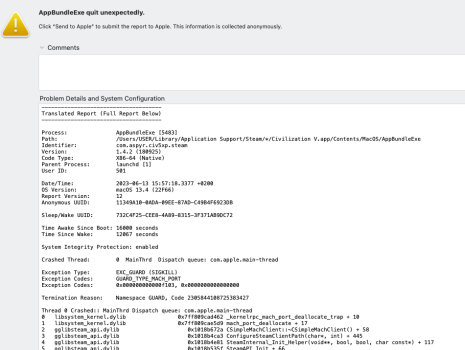
Civilization 5 (steam) wont start anymore on Ventura latest stable, late 2013 kepler 750M (OCP). It was running fine in februari, most recent version gives EXC_GUARD (SIGKILL) etc.
Reinstalled game/steam after cleanup and most recent updates in OCP 6.6. Still not working, have been googling 2 days, can't find other threads.
Reinstalled game/steam after cleanup and most recent updates in OCP 6.6. Still not working, have been googling 2 days, can't find other threads.
Attachments
izzy0242mr
macrumors 6502a
I have the issue where when I enter fullscreen on Citrix while plugged into my external 4K monitor, it doesn't show two windows for Citrix. It usually projects onto the external display while giving visual artifacting on the laptop screen so that I can't actually use or see anything on the laptop screen. Have you encountered anything like this?Citrix Workspace/Viewer 2305, which just came out last week, fixes the frequent disconnects / reconnects I was getting on my Ventura M1 machine. I didn't have this problem on my Monterey or Ventura Intel machines.
About this release | Citrix Workspace™ app for Mac
Learn about the new features, fixed issues, and known issues within Citrix Workspace app for Mac.
EDIT:
Not completely gone. Mostly gone, but not 100% gone. 🙁
Oh well, now the brief disconnects are very infrequent, whereas before it was many times a day.
EugW
macrumors P6
I don't use that type of setup so I can't test it, sorry. My primary Citrix machine is a desktop with 1 screen.I have the issue where when I enter fullscreen on Citrix while plugged into my external 4K monitor, it doesn't show two windows for Citrix. It usually projects onto the external display while giving visual artifacting on the laptop screen so that I can't actually use or see anything on the laptop screen. Have you encountered anything like this?
I'm having the damndest time getting VideoProc to work on a brand new Macbook Pro, right out of the box with zero limitation on it. No matter what network I'm on (work or home), I get this message, no matter what I paste into the downloader. It works fine on my old laptop, and I can't figure out any difference. Again, this computer is right out of the box 2 weeks ago. Any help would be amazing, because VideoProc's support has been useless on this issue for 2 weeks.