
Got a tip for us?
Let us know
Become a MacRumors Supporter for $50/year with no ads, ability to filter front page stories, and private forums.
Weather Widget
- Thread starter anpaman
- Start date
- Sort by reaction score
You are using an out of date browser. It may not display this or other websites correctly.
You should upgrade or use an alternative browser.
You should upgrade or use an alternative browser.


retta283
macrumors 68040
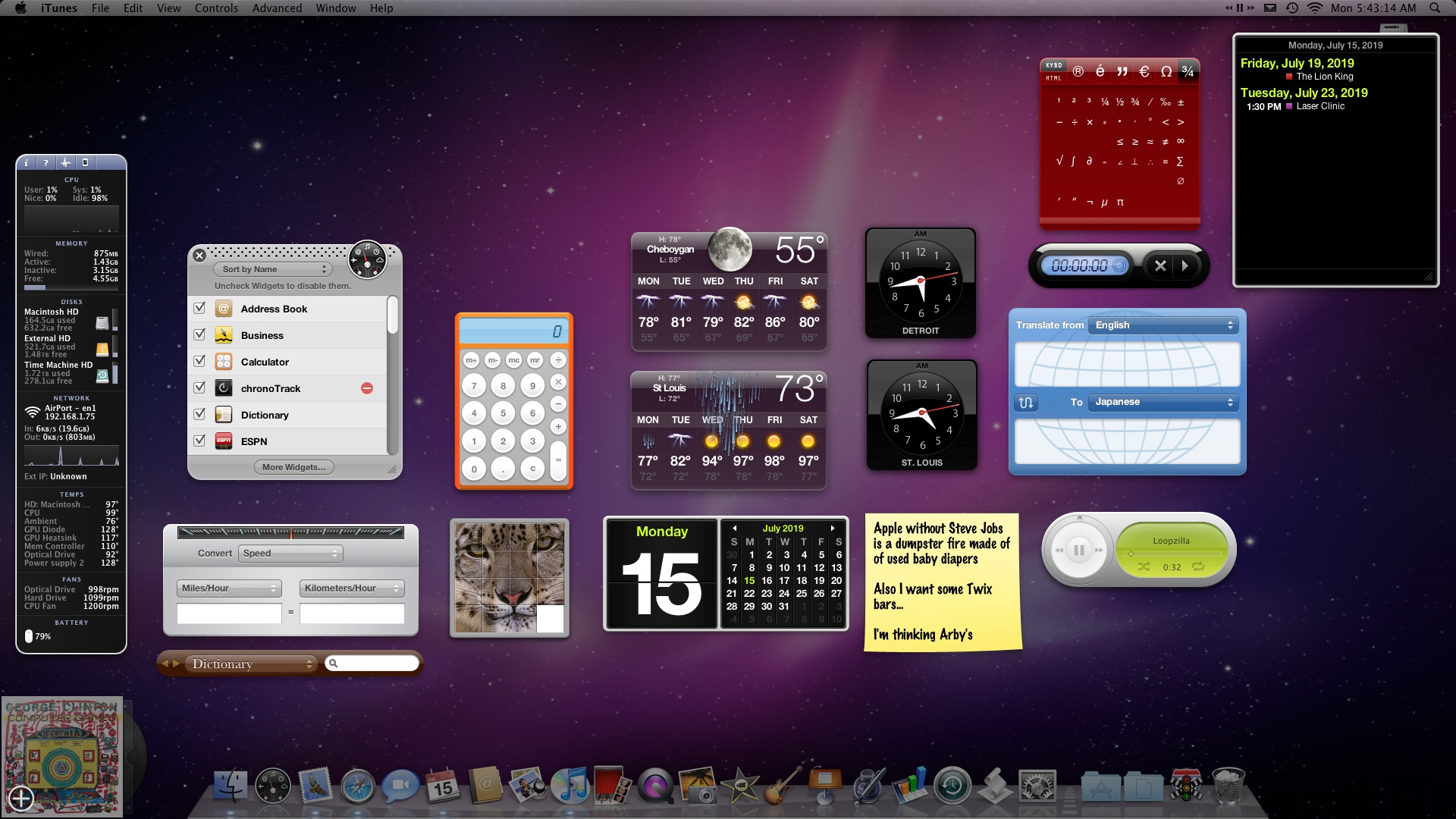
Yes it's just part of dashboard. If you turn it on you can just hit a key and bring it up, then hit it again to dismiss.I’m on mojave, are the widgets part of dashboard? Do they work on mojave? Do they just float on your desktop? Because some of those widgets look very useful - like the dictionary, etc.
[doublepost=1554397516][/doublepost]You have to enable dashboard as an overlay in Mission Control, not a space


adrianlondon
macrumors 604
I have the bottom-right "hot corner" set to overlay the dashboard. Love it.
I use the upper-left and, yes, I like the Dashboard overlay and widgets! Quick way to bring up a simple calculator, read my daily favorite comic strips, see the weather forecast and look at my machine status (iStat)...

Princess Cake
macrumors 6502
Theres no reason why Apple should remove Dashboard, its just Apples and Oranges compared to Notification Center. Neither one is really better than the other, they're just alternative methods of getting info.
And honestly Dashboard is one of the few things like in Mojave that still feels like Apple software and not Windows 8 Metro carbon copy.
And honestly Dashboard is one of the few things like in Mojave that still feels like Apple software and not Windows 8 Metro carbon copy.
retta283
macrumors 68040
The only reason I say they will remove it is the possible ARM Macs. If they do a completely new version of OS X for ARM I doubt they'd put the time into rewriting Dashboard for ARM.Theres no reason why Apple should remove Dashboard, its just Apples and Oranges compared to Notification Center. Neither one is really better than the other, they're just alternative methods of getting info.
And honestly Dashboard is one of the few things like in Mojave that still feels like Apple software and not Windows 8 Metro carbon copy.
I would miss it though. It's the only piece of OS X that is the same as Snow Leopard in terms of UI, and I use it daily.
JoeInMilwaukee
macrumors regular

LizKat
macrumors 604
Working again in Lion!
It's working again for me now again in Mojave, after not working for a week or two, anyway long enough I had removed it. Happy to have it back. Why don't they make up their minds.

Raging Dufus
macrumors 6502a
Hello from the PowerPC Macs forum, I was searching the term “Dashboard” in MR and came across this thread. Glad your weather widgets are functioning again, didn’t know the problem had been fixed; I found a workaround when it happened and just haven’t looked back. Thought I’d add my solution here for posterity, in case it happens again. This fix applies to MacOS 10.11 El Capitan, but given that Dashboard hasn’t really changed, it should also work in earlier and later versions of the OS. YMMV, try at your own risk.
So here’s the deal: the Apple-supplied Weather widget from 10.5 Leopard will work in newer versions of OS X & MacOS. You just have to make sure you’re using its old javascript parser along with it.
I copied the older version of the Weather widget from a PowerBook G4 running Leopard to my MacBook Pro running El Capitan. I then replaced El Cap's javascript weather parser with the one from Leopard. The Leopard version of the widget began to work in El Cap, so I disabled the newer version and have since been using the older one without issue.
The weather parser script can be found in a Leopard install by going into the Finder’s “Go” menu and typing /System/Library/WidgetResources/.parsers/ into the "Go to Folder" box. The one you want is "weatherParser.js" - copy that from Leopard and paste it into the same place in El Capitan (or whichever version of MacOS you’re using).
PLEASE NOTE: Doing this will break the newer version of the weather widget. You can use it again, but you’ll need to have saved the weatherParser.js file you replaced, and restore it; or copy one over from a different MacOS install. The two parsers are incompatible with each other; the Leopard version pulls its data from Accuweather, while newer versions pull it from The Weather Channel. I prefer Accuweather, so this isn’t a problem for me.
There may be a way to keep and use both widgets with their respective parsers, but I didn’t look into that. I like the older version of the widget better anyway, and this fixed my problem so I didn’t investigate further.
FWIW
So here’s the deal: the Apple-supplied Weather widget from 10.5 Leopard will work in newer versions of OS X & MacOS. You just have to make sure you’re using its old javascript parser along with it.
I copied the older version of the Weather widget from a PowerBook G4 running Leopard to my MacBook Pro running El Capitan. I then replaced El Cap's javascript weather parser with the one from Leopard. The Leopard version of the widget began to work in El Cap, so I disabled the newer version and have since been using the older one without issue.
The weather parser script can be found in a Leopard install by going into the Finder’s “Go” menu and typing /System/Library/WidgetResources/.parsers/ into the "Go to Folder" box. The one you want is "weatherParser.js" - copy that from Leopard and paste it into the same place in El Capitan (or whichever version of MacOS you’re using).
PLEASE NOTE: Doing this will break the newer version of the weather widget. You can use it again, but you’ll need to have saved the weatherParser.js file you replaced, and restore it; or copy one over from a different MacOS install. The two parsers are incompatible with each other; the Leopard version pulls its data from Accuweather, while newer versions pull it from The Weather Channel. I prefer Accuweather, so this isn’t a problem for me.
There may be a way to keep and use both widgets with their respective parsers, but I didn’t look into that. I like the older version of the widget better anyway, and this fixed my problem so I didn’t investigate further.
FWIW

Mr_Brightside_@
macrumors 601
Downloading Leopard from Apple Developer now. Fingers crossed!Hello from the PowerPC Macs forum, I was searching the term “Dashboard” in MR and came across this thread. Glad your weather widgets are functioning again, didn’t know the problem had been fixed; I found a workaround when it happened and just haven’t looked back. Thought I’d add my solution here for posterity, in case it happens again. This fix applies to MacOS 10.11 El Capitan, but given that Dashboard hasn’t really changed, it should also work in earlier and later versions of the OS. YMMV, try at your own risk.
So here’s the deal: the Apple-supplied Weather widget from 10.5 Leopard will work in newer versions of OS X & MacOS. You just have to make sure you’re using its old javascript parser along with it.
I copied the older version of the Weather widget from a PowerBook G4 running Leopard to my MacBook Pro running El Capitan. I then replaced El Cap's javascript weather parser with the one from Leopard. The Leopard version of the widget began to work in El Cap, so I disabled the newer version and have since been using the older one without issue.
The weather parser script can be found in a Leopard install by going into the Finder’s “Go” menu and typing /System/Library/WidgetResources/.parsers/ into the "Go to Folder" box. The one you want is "weatherParser.js" - copy that from Leopard and paste it into the same place in El Capitan (or whichever version of MacOS you’re using).
PLEASE NOTE: Doing this will break the newer version of the weather widget. You can use it again, but you’ll need to have saved the weatherParser.js file you replaced, and restore it; or copy one over from a different MacOS install. The two parsers are incompatible with each other; the Leopard version pulls its data from Accuweather, while newer versions pull it from The Weather Channel. I prefer Accuweather, so this isn’t a problem for me.
There may be a way to keep and use both widgets with their respective parsers, but I didn’t look into that. I like the older version of the widget better anyway, and this fixed my problem so I didn’t investigate further.
FWIW
Edit, haven't had coffee this morning and I thought Leopard install = Leopard DVD. Will have to see if the file is the same on Tiger.
Last edited:
Princess Cake
macrumors 6502
Now it wasn't work again.
This time it might be permanent. Apple has discontinued Dashboard so whatever the heck server the weather widget was using probably has shut down.... lame.
Apple's widget site still works... 3rd party weather widgets might not be as pretty but at least they still work. https://www.apple.com/downloads/dashboard/
Mr_Brightside_@
macrumors 601
Got it working again with the Tiger version of the Widget and parser file, per @Raging Dufus' advice! Files attached. *you must disable SIP
Attachments
Last edited:
Got it working again with the Tiger version of the Widget and parser file, per @Raging Dufus' advice! Files attached.
It doesn't work in high sierra.
Last edited:
Mr_Brightside_@
macrumors 601
Disable SIP. I tested on Sierra.It doesn't work in high sierra.
Princess Cake
macrumors 6502
Got it working again with the Tiger version of the Widget and parser file, per @Raging Dufus' advice! Files attached. *you must disable SIP
Where's the parser file go?
Mr_Brightside_@
macrumors 601
The weather parser script can be found by typing or pasting /System/Library/WidgetResources/.parsers/ into the "Go to Folder" box in Finder>Go.Where's the parser file go?
Paste in the parser I uploaded. You can back up the existing in the hopes that it starts working again (though so far the 'old' files work perfectly).
Again, you must disable SIP for this to work. I think it can be re-enabled after.
Princess Cake
macrumors 6502
The weather parser script can be found by typing or pasting /System/Library/WidgetResources/.parsers/ into the "Go to Folder" box in Finder>Go.
Paste in the parser I uploaded. You can back up the existing in the hopes that it starts working again (though so far the 'old' files work perfectly).
Again, you must disable SIP for this to work. I think it can be re-enabled after.
Awesome...... awesome to the max.
Awesome...... awesome to the max.
It still not work for me in high sierra.
Do you use high sierra too ?
Princess Cake
macrumors 6502
It still not work for me in high sierra.
Do you use high sierra too ?
I'm using Snow Leopard. Maybe you're not doing it correctly? Click on your desktop, click on "Go" in the menubar, click "Go to Folder..." and paste /System/Library/WidgetResources/.parsers/ into it.
Once that folder appears you paste the new parser file that Brightside posted into it. (Which on later versions of OS X requires disabling the SIP security system)
After that you go to Library/Widgets and paste the new Weather.wdgt into it.
After that you can either log out or go to activity manager and kill the dashboard clients making them restart.
I'm using Snow Leopard. Maybe you're not doing it correctly? Click on your desktop, click on "Go" in the menubar, click "Go to Folder..." and paste /System/Library/WidgetResources/.parsers/ into it.
Once that folder appears you paste the new parser file that Brightside posted into it. (Which on later versions of OS X requires disabling the SIP security system)
After that you go to Library/Widgets and paste the new Weather.wdgt into it.
After that you can either log out or go to activity manager and kill the dashboard clients making them restart.
I think it doen't work because I had delete the default weather widget.
Is possible to resintall the default weather widget ?
Mr_Brightside_@
macrumors 601
I'm having difficulty on High Sierra atm too.
Could you make it work in High Sierra ?